WordPress Hosting: Shared, Managed, and Self-Hosted VPS Compared
WordPress powers around 40 percent of the web, which means there is an enormous market of hosting options designed around it. The three main paths — shared hosting, managed WordPress hosting, and a self-hosted VPS — differ significantly in cost, performance, control, and how much you have to manage yourself. Here is how to think through the choice.
Shared Hosting: Cheapest, Least Control
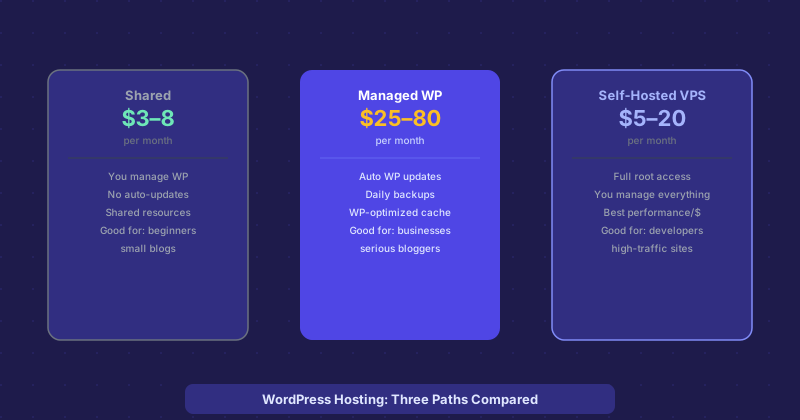
Shared hosting puts your WordPress site on a server alongside dozens or hundreds of other websites, all sharing the same CPU, memory, and disk resources. Plans typically cost $3–10 per month and come with a one-click WordPress installer, a control panel like cPanel, and some form of automated backups.
The advantages are obvious: it is cheap and requires no technical knowledge to set up. The disadvantages are real too. Performance is inconsistent — a traffic spike from a neighboring site can slow yours down. WordPress core updates, plugin updates, and PHP version management are your responsibility. Security patches that require server-level changes may lag behind what the host applies to shared infrastructure.
Shared hosting makes sense for personal blogs, small informational sites, and anyone testing out WordPress for the first time. It is not appropriate for a business where downtime or slow performance would cost money.
Managed WordPress Hosting: More Expensive, More Done For You
Managed WordPress hosting — offered by providers like WP Engine, Kinsta, Flywheel, and Cloudways — is infrastructure specifically tuned for WordPress with operational management included. Plans typically run $25–100 per month for a single site.
What you get for the premium: automatic WordPress core updates, plugin update management, daily or hourly backups with easy one-click restore, server-level caching optimized for WordPress, malware scanning, and a support team that actually understands WordPress rather than generic hosting issues. The servers are typically running Nginx with full-page caching configurations that make a WordPress site perform significantly faster than on generic shared hosting.
The tradeoff is cost and some restrictions. Many managed hosts disallow certain plugins that interfere with caching or security. You have less control over the server environment. But for a business where the site generates revenue, the reliability and peace of mind is usually worth the price difference.
Self-Hosted VPS: Most Control, Most Work
A VPS gives you a virtual server — dedicated CPU and RAM on shared physical hardware — where you install and configure everything yourself. Providers like DigitalOcean, Linode, Hetzner, and Vultr offer plans starting around $5–20 per month. For that price you get hardware resources that would cost $50+ on a managed WordPress host.
The performance per dollar is excellent. A $20 VPS from Hetzner or DigitalOcean will outperform most shared hosting plans at a fraction of the price of managed hosting. You have complete control: choose your PHP version, configure nginx or Apache exactly how you want, set up Redis for object caching, install custom software.
The cost is your time and technical knowledge. You are responsible for OS security updates, PHP updates, web server configuration, SSL certificate renewal, and backups. If something breaks at 2am, you are the one who fixes it. This is appropriate for developers or technically confident site owners, not for someone who wants to focus entirely on content.
Performance Reality Check
A well-configured VPS with Nginx, PHP-FPM, Redis, and page caching will handle far more traffic than a shared hosting account, at a lower price than managed hosting. But "well-configured" is doing a lot of work in that sentence. A misconfigured VPS will be slower and less secure than either alternative. If you go the VPS route, use a stack like ServerPilot, SpinupWP, or GridPane to manage the WordPress-specific configuration — these tools give you most of the VPS performance benefits without requiring you to be a Linux administrator.
The Right Choice by Situation
Personal blog or hobby site with under 10k monthly visitors: shared hosting is fine. A business site where speed and reliability matter and the budget is there: managed WordPress hosting. A developer, agency, or technically comfortable site owner running multiple sites: VPS with a management layer. The worst choice is paying for managed hosting features you could configure yourself, or putting a business-critical site on shared hosting and wondering why it is slow.