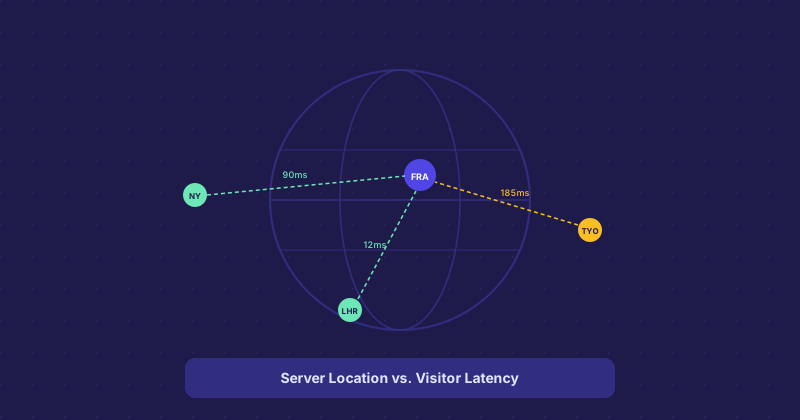
Server Location and Website Speed: How Close Does Your Host Need to Be
Every millisecond of network latency adds up. The physical distance between a visitor and the server they are connecting to is one of the fundamental constraints on how fast a website can feel, regardless of how well-optimized the site itself is. But the relationship between location and speed is more nuanced than just "pick a server near your visitors."
The Physics of Latency
Data travels through fiber-optic cables at roughly two-thirds the speed of light in a vacuum, with additional delays at every router and network handoff along the way. A request from London to a server in London might take 5ms round-trip. The same request to a server in Singapore might take 180ms. That gap compounds across every request a page makes.
For a page that requires 20 separate requests (HTML, CSS, JS, fonts, images), even 50ms extra per request adds a full second to load time — and that is before factoring in any server-side processing time.
When Location Matters Most
Server location has the biggest impact on Time to First Byte (TTFB) — the time from the browser sending a request to receiving the first byte of the response. For non-cached, dynamically-generated pages, TTFB is dominated by network latency plus server processing time. A geographically distant server produces a measurably higher TTFB on these pages.
For cached static assets delivered over HTTP/2 or HTTP/3, the impact is still present but more modest — the parallel nature of the protocols reduces the per-request latency penalty.
CDNs as the Primary Solution
The standard answer to the server location problem is a CDN. Rather than moving your server, you cache your static assets at edge locations close to your users. A visitor in Tokyo requesting a site hosted in Frankfurt still makes the initial HTML request over the Atlantic, but all the static assets (images, CSS, JS) come from a Tokyo edge node.
For sites with a global audience, a CDN resolves most of the location disadvantage for everything except the initial HTML request and API calls. For sites where most visitors are in one region, choosing a server in or near that region is more direct.
Multi-Region Hosting
For applications where latency is critical — real-time collaboration, gaming, financial trading platforms — single-server hosting in any one region is not sufficient. These applications are built on multi-region infrastructure: servers in multiple geographic zones with traffic routed to the nearest healthy instance. This is significantly more complex and expensive, but latency at this level requires it.
How to Pick a Server Location
Identify where the majority of your target audience is. Google Analytics or Cloudflare analytics can tell you where your current visitors come from. If 70% of your visitors are in the United States, a US server (ideally on the East or West coast depending on the concentration) is the right default. If your audience is global, pick a central location and pair it with a CDN.
Data sovereignty and compliance requirements sometimes override the performance-based choice. GDPR considerations, local data residency laws, and industry regulations may require data to stay in specific regions regardless of where your users are.
Testing Latency Before You Commit
Most hosting providers have multiple data center options. Before committing to one, test the latency from your target regions using tools that ping from multiple global locations. Many hosting providers also offer 30-day money-back guarantees, which gives you time to test real-world performance with actual traffic before locking in.