CDN Origin vs Edge: Understanding Where Your Content Actually Lives
Using a CDN without understanding the distinction between origin and edge is a bit like using a library without understanding the difference between the central archive and the local branch. Everything seems to work until something goes wrong, at which point the mental model matters a lot for debugging. Here is a clear explanation of what each layer does and how they interact.
The Origin Server
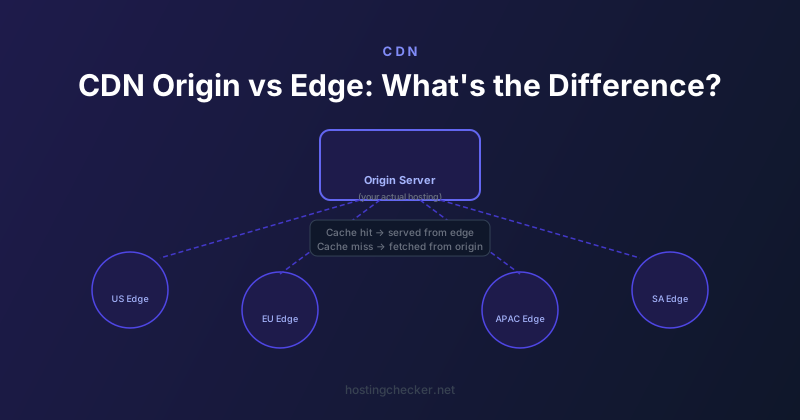
Your origin server is your actual web server: the machine or cloud instance running your application, serving your files, and connecting to your database. When someone says a request hits the origin, they mean it went all the way back to your infrastructure rather than being served from the CDN.
The origin is the source of truth. Every piece of content that the CDN caches came originally from the origin. When the CDN does not have a cached copy of something, or when the cache has expired, it fetches a fresh copy from the origin and stores it for future requests.
Edge Nodes
CDN providers operate hundreds or thousands of servers distributed globally in data centres called Points of Presence (PoPs). These are the edge nodes. When a user makes a request, it is routed to the nearest edge node rather than all the way back to your origin. If the edge node has a cached copy of the requested content, it serves it directly. This is called a cache hit.
The performance improvement from edge caching can be dramatic. A user in Singapore requesting content from a CDN edge node in Singapore might experience 10 to 20 millisecond response times. The same request going all the way to an origin server in New York might take 180 to 250 milliseconds. For a page making dozens of requests, the cumulative difference is significant.
Cache Hit vs Cache Miss
A cache hit means the edge node had the content and served it without contacting the origin. A cache miss means the edge node did not have the content, or the cached copy was expired, and it had to fetch a fresh copy from the origin. Most CDN response headers include an indicator like X-Cache: HIT or X-Cache: MISS that tells you which happened for any given request.
The cache hit ratio, meaning the percentage of requests served from cache, is an important CDN performance metric. A high cache hit ratio means most of your traffic is being absorbed by the CDN and only a small fraction is reaching your origin. A low hit ratio means either your cache TTLs are very short, your content changes very frequently, or your requests have too many unique parameters that prevent effective caching.
Cache TTL and Expiry
The CDN caches content for a period determined by the Cache-Control or Expires headers your origin sends, or by rules you configure in the CDN dashboard. When the TTL expires, the edge node considers its cached copy stale. On the next request, it fetches a fresh copy from the origin and starts the TTL clock again.
Setting TTLs requires balancing freshness against performance. Very short TTLs mean the CDN constantly fetches from origin and provides little caching benefit. Very long TTLs mean outdated content can be served to users even after you have made changes at the origin.
Cache Invalidation and Purging
When you need to update content that is cached at edge nodes before the TTL expires, you purge the cache. CDN providers offer purge APIs and dashboard interfaces for removing specific files, directories, or entire caches from edge nodes. After a purge, the next request to each edge node fetches fresh content from the origin.
Understanding that the CDN has many edge nodes globally is important here. A cache purge propagates across the CDN network, but this takes a few seconds to a few minutes to complete. If users in different regions make requests during the purge propagation, they may briefly see inconsistent content from different edges.
Origin Shield
Many CDN providers offer an origin shield feature, also called origin protect or similar names. This adds an intermediate caching layer between the edge nodes and your origin. Instead of every edge node fetching directly from your origin on a cache miss, they fetch from the origin shield, which is a single centrally located edge node that acts as a shared intermediate cache.
Origin shield dramatically reduces the load on your origin during traffic spikes or after a cache purge. Without it, a popular item expiring from many edge nodes simultaneously could send hundreds of parallel requests to your origin in the few seconds before caches are repopulated.
Debugging Origin vs Edge Issues
When something looks wrong on a CDN-fronted site, the first diagnostic question is whether the problem is at the origin or at the edge. Bypassing the CDN by connecting directly to the origin IP address, using curl with a Host header override, or temporarily disabling CDN proxying tells you whether the origin is serving the correct content. If the origin looks fine but the CDN is serving something different, the issue is in caching, cache invalidation, or CDN configuration. If the origin itself is wrong, the CDN cache just makes it more persistent and harder to notice.