Email Bounce Codes Explained: What 550, 421, and Other SMTP Errors Actually Mean
When an email bounces, the notification usually contains a three-digit code and some text that sounds technical and unhelpful. These codes follow a standard and, once you know the pattern, they tell you exactly what went wrong and whether it is worth retrying.
The SMTP Response Code Structure
SMTP response codes are three digits. The first digit indicates the category:
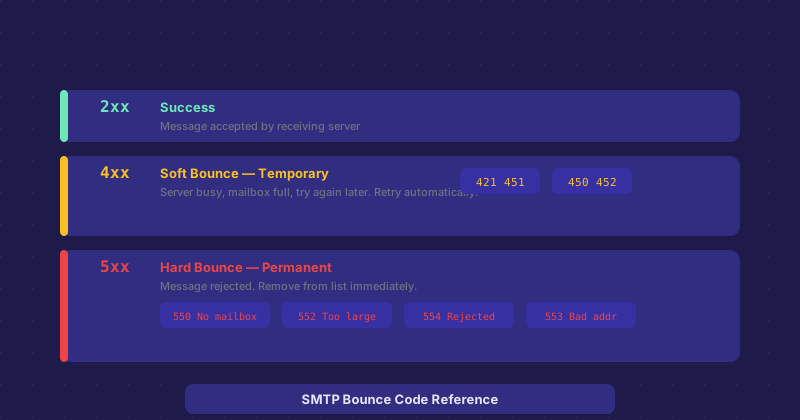
- 2xx — Success. The server accepted the command.
- 4xx — Temporary failure. The server could not process the request right now but might succeed if you try again.
- 5xx — Permanent failure. The server rejected the message and retrying will not help.
The second and third digits add specificity. The accompanying text message, written by the receiving server, usually adds human-readable context.
Common 4xx Codes (Soft Bounces)
421 is a service unavailable or temporarily busy message. The receiving server is overloaded, undergoing maintenance, or temporarily refusing connections. Your mail server should automatically retry delivery over the next few hours. No action needed on your end.
450 indicates the mailbox is unavailable — possibly because it is full, temporarily locked, or the recipient server is under load. Again, your server retries automatically.
451 means the server encountered an error while processing the request. This could be a DNS problem on the receiving end, a database error, or a policy check that is temporarily failing. Retry behavior applies.
Common 5xx Codes (Hard Bounces)
550 is the most common hard bounce. It means the mailbox does not exist — the address you sent to is not valid on that server. Common causes: typo in the email address, the account has been deleted, or the domain's MX records are misconfigured.
551 means the user is not local and the server will not forward. You have sent to an address the server does not handle and it is not willing to relay it.
552 indicates the message exceeded the size limit. The recipient's mailbox is full, or your attachment was too large.
553 means the mailbox name is not allowed — often triggered by syntax errors in the email address.
554 is a catch-all rejection, often with a more detailed reason in the text. Common causes include sending from a blacklisted IP, failing spam filters, or authentication failures (SPF, DKIM, DMARC). This is the code most commonly associated with email ending up blocked entirely rather than delayed.
Reading the Full Bounce Message
The three-digit code is the starting point. The text that follows it is written by the receiving server and often much more informative. Messages like "550 5.1.1 The email account that you tried to reach does not exist" or "554 5.7.1 Message rejected due to spam content" tell you exactly what happened. Take the full text of the bounce message rather than just the numeric code when searching for a solution.
When 550 Codes Are About Your Sending Reputation
A 550 code does not always mean the address is wrong. Some receiving servers return 550 as a blanket rejection for email they consider suspicious — regardless of whether the address exists. If you are getting 550 errors for addresses you know are valid, the issue is likely your sending IP reputation, missing authentication records, or content that is triggering spam filters.
Check whether your IP is on any major blocklists (MXToolbox has a lookup for this). Verify that your SPF, DKIM, and DMARC records are properly configured. Review your email content for spam trigger phrases.
Hard Bounces and List Hygiene
Any address that produces a hard bounce (5xx) should be removed from your mailing list immediately and permanently. Continuing to send to hard-bounce addresses harms your sender reputation. Most email service providers automatically suppress hard bounce addresses, but if you are managing your own sending infrastructure, this is something you need to track and enforce manually.