What is SMTP and How Email Actually Gets from Your Outbox to Someone Else
SMTP — Simple Mail Transfer Protocol — is the protocol that moves email from one server to another. It was designed in 1982 and has been extended many times since, but the core conversation between mail servers is remarkably similar to what it was four decades ago. Understanding it explains why email sometimes fails and how to fix it.
SMTP is a Push Protocol
SMTP is designed for pushing mail from a sender to a receiver. It is not used for reading your email — that is IMAP or POP3. SMTP handles outbound delivery: from your email client to your mail server, and from your mail server to the recipient mail server. Every email delivery involves at least two SMTP conversations: client to sender server, and sender server to recipient server.
The SMTP Conversation
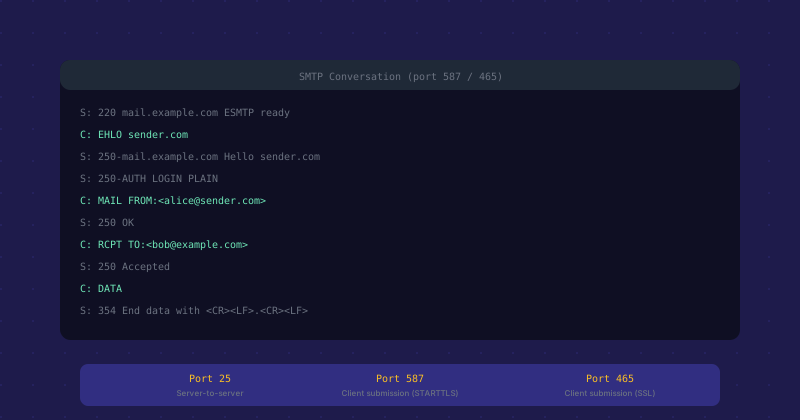
SMTP is a text-based protocol. The client connects to the server, they exchange greetings, and then a structured conversation transfers the message. The server opens with a 220 greeting identifying itself. The client responds with EHLO (Extended Hello) including its own hostname. The server responds with a list of capabilities it supports — authentication methods, size limits, TLS support.
Then the envelope is established: MAIL FROM identifies the sender address, RCPT TO identifies each recipient. The server accepts or rejects each recipient. If all recipients are accepted, the client sends DATA, followed by the full message including headers and body, terminated by a line containing just a period. The server responds with a 250 OK and a message ID if accepted, or an error code if rejected.
SMTP Ports and When Each is Used
Three ports are relevant for SMTP. Port 25 is the original SMTP port used for server-to-server relay — your mail server accepts connections on port 25 from other mail servers delivering inbound mail, and sends outbound mail to other servers on their port 25. Most residential and cloud provider IPs have port 25 outbound blocked to prevent spam from compromised machines.
Port 587 (submission with STARTTLS) is for email clients submitting mail to their outbound server. STARTTLS upgrades the connection to TLS after the initial plaintext greeting. Port 465 (SMTPS) is submission over direct TLS — the TLS handshake happens before any SMTP conversation. Port 587 is the standard; port 465 is technically legacy but still widely used and supported.
SMTP Authentication
When your email client submits mail to your outbound server, it authenticates with username and password using AUTH LOGIN or AUTH PLAIN mechanisms (both send credentials encoded in base64, so TLS is essential — never use SMTP auth over unencrypted connections). Modern mail providers increasingly require OAuth2 instead of password authentication, which is more secure since app-specific tokens can be revoked without changing the main account password.
SMTP Error Codes
SMTP uses three-digit response codes. The first digit indicates the category: 2xx means success, 4xx means temporary failure (try again later), 5xx means permanent failure (do not retry). When email bounces, the bounce message includes the SMTP code from the receiving server. 550 means the mailbox does not exist. 552 means the message was too large. 554 means rejected — usually for spam policy reasons. 421 means the server is temporarily unavailable and delivery should be retried.
SMTP Relaying and Open Relays
Mail relay — accepting mail from one domain and forwarding it to another — is a core SMTP function but also a historical security problem. An open relay accepts mail from anyone and forwards it to anyone, making it a tool for spammers to send through legitimate-looking infrastructure. All modern mail servers require authentication before relaying and only relay for authorized users and domains. Running an open relay will get your server blacklisted very quickly.
Diagnosing SMTP Problems
You can test SMTP delivery manually with telnet mailserver.example.com 25 and typing the SMTP commands directly. This lets you see exactly what the server returns at each step. For TLS-protected submission, openssl s_client -connect mailserver.example.com:587 -starttls smtp opens a TLS connection. Watching the SMTP conversation directly is the most reliable way to diagnose delivery problems — you see the exact error message the receiving server returns rather than interpreting a bounce notification.