Server Uptime, SLAs, and What "99.9% Uptime" Actually Means
Nine nines. Five nines. 99.9%. 99.99%. Hosting providers put these numbers on every pricing page. What do they mean in practice, what is actually guaranteed, and what should you do when the host does not meet them?
The Math Behind the Percentages
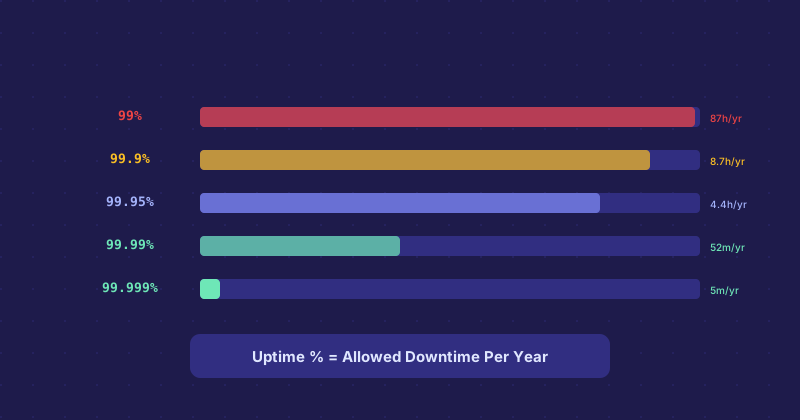
Uptime percentages translate directly into maximum allowed downtime per year:
- 99% uptime — about 87 hours of downtime per year
- 99.9% uptime — about 8.7 hours per year
- 99.95% uptime — about 4.4 hours per year
- 99.99% uptime — about 52 minutes per year
- 99.999% uptime — about 5 minutes per year
99.9% sounds impressive until you realize it allows nearly nine hours of downtime annually. For a low-traffic blog, that is probably acceptable. For an e-commerce site, nine hours of downtime is potentially thousands of dollars in lost sales.
What the SLA Actually Covers
Reading SLAs carefully almost always reveals that the uptime guarantee applies to network availability, not your specific website being up. If your site goes down because of a misconfiguration, a software error, a PHP crash, or a database problem, that is typically outside the SLA. The host guarantees their infrastructure is reachable, not that your application is functioning.
The remedy in most SLAs is also worth noting. Many providers offer account credits proportional to the downtime. A credit is not cash back — it is a discount on future service. And the credit is often only issued if you proactively file a support ticket claiming it within a narrow window after the incident.
How Hosts Measure Uptime
This matters more than most people realize. Some providers measure uptime from their own monitoring, which may not detect problems users actually experience. Third-party monitoring services measure from multiple external locations and catch incidents that internal monitoring misses. If a host calculates SLA compliance from their own metrics, they have an incentive to define the monitoring in ways that show better numbers.
What to Actually Evaluate
The SLA number is less useful than the provider's historical incident record. Look for a public status page and check whether past incidents are documented honestly — time to detect, duration, root cause, and resolution. Hosts that maintain transparent post-mortems tend to have better operational cultures than those who quietly resolve incidents without documentation.
Community forums, hosting review sites, and server monitoring comparison tools can give you a realistic picture of actual uptime experience across many customers — which is more reliable than a marketing claim.
Building Your Own Uptime Monitoring
Do not rely solely on the host's own status page. Set up independent uptime monitoring from a service like UptimeRobot (free tier covers most needs), Better Uptime, or Freshping. These ping your site from multiple locations every minute or few minutes and alert you immediately when downtime is detected. You know before your customers tell you.
This also gives you documentation. If you need to file an SLA credit claim, having your own monitoring logs with timestamps is more convincing than relying on your memory of when things went wrong.
High Availability vs. High Uptime
True high availability requires architecture, not just a better host. Load balancers, multiple servers, database replication, health checks with automatic failover — these are what allow systems to survive individual component failures without the site going down. A single server with a 99.99% SLA is still a single point of failure. The architecture that prevents downtime is your responsibility to design and implement.