What is a robots.txt File and What Does It Actually Control
Almost every website has a robots.txt file, and almost every website owner has heard that it controls what search engines can see. The reality is more nuanced. robots.txt is a polite request, not a barrier — and confusing the two leads to real problems.
What robots.txt Is
robots.txt is a plain text file that lives at the root of your domain — always at yourdomain.com/robots.txt. It uses the Robots Exclusion Protocol, a standard that well-behaved crawlers agree to follow. The file contains directives specifying which user-agents (crawlers) are allowed or disallowed from accessing which paths on your site.
The Basic Syntax
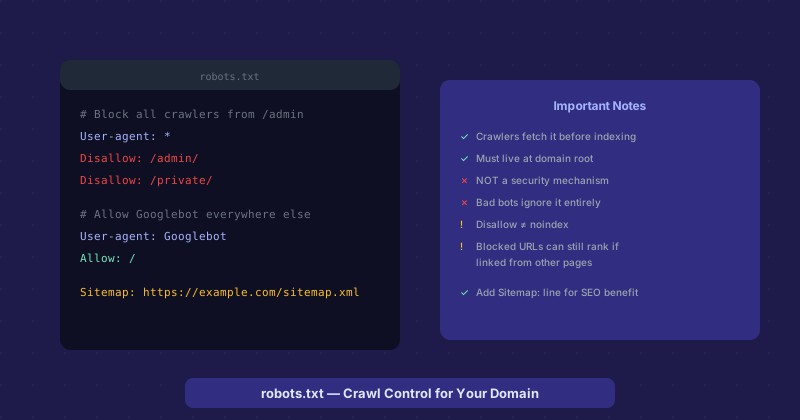
Each block in robots.txt starts with a User-agent line specifying which crawler the rules apply to, followed by Disallow or Allow directives. User-agent: * applies to all crawlers. User-agent: Googlebot applies only to Google. User-agent: Bingbot applies only to Bing.
Disallow: /admin/ tells crawlers not to visit any URL starting with /admin/. Disallow: / disallows everything. Disallow: (empty) allows everything. Allow: /public/ within a broader Disallow context explicitly permits a specific path. The file also commonly includes a Sitemap: directive pointing to your XML sitemap, which helps crawlers discover all the URLs you want indexed.
What robots.txt Does Not Do
This is where most misconceptions live. robots.txt is not a security mechanism. A disallow directive politely asks crawlers not to visit a path. Malicious bots, vulnerability scanners, and scrapers do not follow this protocol. Putting your admin panel path in robots.txt does not hide it from attackers — it actually advertises it, since robots.txt is public and one of the first files anyone inspecting a site checks.
robots.txt also does not prevent pages from being indexed. This surprises many people. A page blocked by robots.txt cannot be crawled, but if other sites link to it, Google can still know it exists and index a placeholder in search results (without content, since it could not crawl the page). To actually prevent a page from appearing in search results, you need a noindex directive in the page headers or meta tags — not a robots.txt disallow.
The Disallow vs. Noindex Confusion
This distinction matters in practice. If you want to keep a page out of search results, use noindex. Add <meta name="robots" content="noindex"> to the page, or send an X-Robots-Tag: noindex HTTP header. If you use robots.txt to disallow the page, Googlebot cannot crawl it — so it cannot read the noindex instruction either. A disallowed page without a noindex signal can still show up in search results as a URL-only result with no description.
The correct pattern: if you want a page not indexed, noindex it. If you want to save crawl budget by not having crawlers spend time on utility pages (paginated results, parameter-based URLs, admin areas), then robots.txt disallow is appropriate — but accept that those pages might still appear in search results as bare URLs.
Crawl Budget and Large Sites
For small sites, crawl budget is not a concern — Googlebot will crawl everything important quickly. For very large sites with millions of pages, crawl budget — the number of pages Googlebot will crawl within a given period — becomes relevant. Using robots.txt to disallow low-value pages (duplicate content, parameterized URLs, utility pages) lets Googlebot spend its crawl budget on the pages that matter.
Writing robots.txt for Common Scenarios
A minimal robots.txt for most sites: User-agent: * followed by Disallow: (empty, allowing everything), and a Sitemap: line pointing to your sitemap. This is cleaner than no robots.txt file at all and gives crawlers your sitemap location. Add specific disallow rules only for paths you genuinely want crawlers to skip — admin interfaces, search result pages with parameters, print versions, or API endpoints that should not be in search results.
Testing Your robots.txt
Google Search Console has a robots.txt tester that shows you how Googlebot interprets your file and lets you test specific URLs against your rules. Use it after making changes to verify the file behaves as intended. A syntax error in robots.txt — like a missing blank line between rule groups — can cause the entire file to be misinterpreted, accidentally blocking crawlers from your entire site.