What Is Docker and How It Changes the Way Applications Are Hosted
Docker changed how software is deployed. Before containers, deploying an application meant configuring a server: installing the right language runtime version, installing dependencies, creating configuration files, managing conflicts between multiple applications sharing the same server. Containers package an application with all its dependencies into a single portable unit that runs the same way on any host that has the container runtime installed. Understanding containers is increasingly important for anyone making hosting decisions.
What a Container Actually Is
A container is a process (or group of processes) running on a Linux host, isolated from other processes using kernel features called namespaces and cgroups. Namespaces provide isolation: the process inside a container sees its own filesystem, its own network interfaces, its own process ID space, and its own user IDs, without being able to see or interfere with the host system or other containers. Cgroups (control groups) enforce resource limits: a container can be constrained to a specific number of CPU cores and a maximum amount of memory.
Docker is the most popular tooling for building and running containers. A Dockerfile is a text file that describes how to build a container image: what base image to start from (a minimal Linux distribution, a language runtime, a web server), what files to copy in, what commands to run to install dependencies, and what command to run when the container starts. Building a Dockerfile produces an image — a layered filesystem snapshot. Running an image produces a container — a live process using that filesystem.
Containers vs Virtual Machines
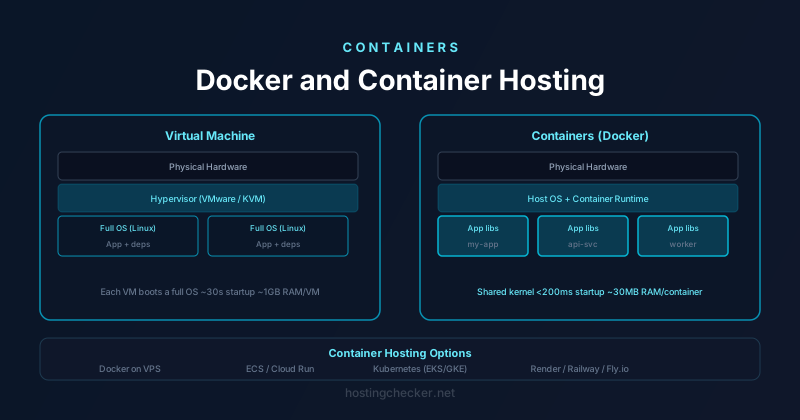
Virtual machines provide isolation by emulating hardware. Each VM runs a complete operating system, including its own kernel, on top of a hypervisor. This is thorough isolation but expensive: each VM needs memory for its own OS, CPU cycles for the overhead of virtualisation, and seconds or minutes to boot. Containers share the host kernel. They do not need their own OS, so they are much lighter weight: a container can start in milliseconds, use tens of megabytes of memory rather than gigabytes, and hundreds of containers can run on a single host that would only support a handful of VMs.
The trade-off is isolation depth. Because containers share the host kernel, a kernel vulnerability can theoretically be exploited to escape container isolation in a way that is much harder with VM isolation. For multi-tenant hosting where complete isolation between customers is required, VMs remain the right choice. For single-tenant deployments, or environments where the threat model does not include malicious tenants on the same host, containers' much better density and startup time make them the practical choice for most modern application deployment.
Why Containers Changed Hosting
Before containers, the standard deployment pattern was: provision a server, install the application stack, configure it, deploy code, and maintain that server indefinitely. "Works on my machine" was a pervasive problem — an application that ran on the developer's laptop might fail on the production server because of a different library version, a different OS patch level, or a different configuration. Container images solve this by packaging the exact runtime environment with the application. The image that ran on the developer's laptop is the same image deployed to production.
Containers also make scaling more mechanical. Scaling a containerised application means starting more containers — either on the same host until it reaches capacity, or on additional hosts. Container orchestration systems like Kubernetes automate this: you declare how many container replicas you want, and the system ensures that many are running, restarting failed containers, scheduling new ones when load increases, and draining containers gracefully when nodes need maintenance.
Container Registries
Container images are stored in registries. Docker Hub is the public registry where most open-source images are published. Cloud providers offer private registries: Amazon Elastic Container Registry (ECR), Google Artifact Registry, and GitHub Container Registry. A CI/CD pipeline typically builds a new container image on each code change, tags it with the commit SHA or version number, pushes it to the registry, and then the deployment system pulls the new image and updates running containers. This gives you a complete history of every deployed version of your application, with the ability to roll back to any previous image by changing which tag is running.
Hosting Options for Containerised Applications
The range of hosting options for containers is wide. At the simplest end, you can run Docker on a single VPS — install Docker, run docker run or use docker compose for multi-container applications, and manage it directly. This is fine for small applications but requires manual intervention to update, restart, or scale.
Managed container services handle the operational complexity. AWS Elastic Container Service (ECS), Google Cloud Run, and Azure Container Instances let you deploy a container image and define resource requirements, and the platform handles running, scaling, and maintaining the infrastructure. Cloud Run in particular is notable for scaling to zero (no running instances, no cost when there is no traffic) and scaling up rapidly when requests arrive. For many applications, this serverless container model is economically superior to maintaining a always-on VPS.
Kubernetes is the full orchestration solution: a cluster of nodes, workload scheduling, service discovery, rolling deployments, and a rich ecosystem of tooling. The operational complexity is significant — running your own Kubernetes cluster requires substantial expertise — but managed Kubernetes services (EKS, GKE, AKS) handle the control plane, leaving you to manage only the application workloads. For complex microservice architectures with many interdependent services, Kubernetes' declarative configuration model becomes the right abstraction.
What This Means for Traditional Hosting
Traditional shared hosting and VPS hosting without containers have not disappeared. WordPress and PHP applications on cPanel continue to represent a large fraction of the web because they are straightforward to deploy and operate, and the applications themselves are not containerised. But for new application development, containers are the default packaging format. The developer experience of containers — consistent environments, declarative configuration, easy local development mirroring production — has made them the standard for any application that will be deployed more than once.
If you are evaluating hosting options for a new application, the question is now less "which VPS provider has the best specs" and more "should this be a managed container service, a managed Kubernetes cluster, or a simpler platform-as-a-service?" The right answer depends on application complexity, team expertise, traffic patterns, and cost, but understanding what containers are and what they enable is the prerequisite for making that decision well.