What Is a SRV Record? Service Locator Records Explained
Most people who work with DNS are familiar with A, MX, and NS records. SRV records are less commonly discussed but they play an important role in how certain services discover their infrastructure. If you have set up a VoIP system, an XMPP chat server, or a Minecraft server, you have probably encountered them.
What SRV Records Do
SRV stands for Service. A SRV record specifies the location, meaning the hostname and port number, of a server for a particular service and protocol. Without SRV records, a client that wants to connect to a service needs to either know the port in advance or be configured manually. With SRV records, the client can ask DNS for the right host and port automatically.
This is particularly useful for services that might run on non-standard ports, that want to offer load balancing across multiple servers, or that want to provide failover by listing backup servers with lower priority.
The SRV Record Format
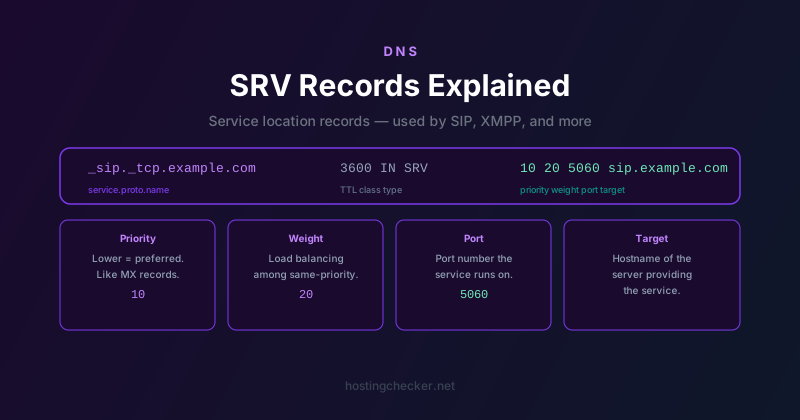
A SRV record has a specific and slightly unusual name format: _service._protocol.name. The service and protocol are prefixed with underscores to distinguish them from regular hostnames.
For example, a SRV record for SIP over TCP for example.com would have the name: _sip._tcp.example.com
The record data has four fields: priority, weight, port, and target. A complete example looks like this:
_sip._tcp.example.com. 3600 IN SRV 10 20 5060 sip.example.com.
Breaking that down: the priority is 10, the weight is 20, the port is 5060, and the target server is sip.example.com.
Priority and Weight
Priority works like MX record priority: lower numbers are preferred. When a client queries for a service and receives multiple SRV records, it tries the ones with the lowest priority number first. If those servers are unavailable, it moves to the next priority tier.
Weight is used for load distribution among records that have the same priority. A record with weight 20 will receive twice as much traffic as a record with weight 10 that has the same priority. This allows a simple weighted round-robin distribution without any additional infrastructure.
If you only have one server and do not need load balancing, weight is typically set to 0 or any arbitrary value since there is nothing to balance against.
Common Services That Use SRV Records
SIP (Session Initiation Protocol) for VoIP is one of the most common uses. When your phone or VoIP client starts up, it can query for _sip._tcp.yourdomain.com or _sip._udp.yourdomain.com to find the right server automatically.
XMPP, the protocol behind Jabber and many chat systems, uses SRV records for both client-to-server connections via _xmpp-client._tcp and server-to-server federation via _xmpp-server._tcp.
Minecraft servers can use SRV records so players can connect to example.com without specifying a port, even if the server runs on a non-standard port. The SRV record maps _minecraft._tcp.example.com to the actual host and port.
Various Microsoft services including Skype for Business and older Exchange configurations use SRV records extensively. If you have ever configured autodiscover for Exchange email, you have likely dealt with SRV records.
How to Add a SRV Record
Most DNS management interfaces support SRV records but the layout of the form varies. You will typically need to enter the service name, protocol, priority, weight, port, and target host separately. Some interfaces want the full name including the underscores and the domain, others want just the service and protocol and add the domain automatically.
One common gotcha: the target field must be a hostname, not an IP address. The DNS specification requires that SRV targets resolve to an A or AAAA record. You cannot put an IP address directly in the target field.
Debugging SRV Records
The standard DNS debugging tools all support SRV records. With dig you can query specifically for SRV records: dig SRV _sip._tcp.example.com. With nslookup you can set the query type to SRV before querying. Online DNS lookup tools including the one at hostingchecker.net let you query any record type including SRV.