What Is a Nameserver and How Do You Change One Without Breaking Your Site
Every domain on the internet has at least two nameservers attached to it. These are the records that tell the rest of the internet where to look when someone wants to find out what IP address your domain points to, where your email is routed, or what other DNS records exist for your domain. Understanding what nameservers do and how to change them safely is one of the most practically important things to know when managing a website.
What a Nameserver Actually Does
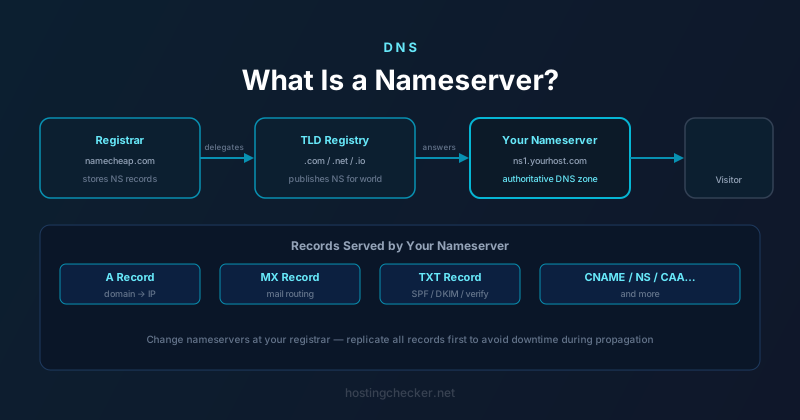
A nameserver is a server that holds the authoritative DNS records for your domain. When a visitor's browser needs to resolve your domain name into an IP address, it eventually reaches the nameservers listed for your domain and asks them for the answer. The nameservers respond with whatever records you've configured: A records pointing to your server, MX records pointing to your mail provider, TXT records for verification and authentication, and so on.
The phrase "authoritative" is important. Every domain has a single set of authoritative nameservers. When the internet wants the truth about your domain's DNS records, this is where it goes. Resolvers may cache the answers for a period determined by the TTL, but the nameservers are the source of record. Changing them does not just change one record — it changes which server gets to answer every DNS question about your domain.
Where Nameservers Live
Nameservers are set at your domain registrar, not at your hosting provider. This is a crucial distinction that trips up many site owners. When you buy a domain from Namecheap, GoDaddy, Google Domains, or any other registrar, you log into that registrar's control panel to change the nameservers. The hosting provider cannot change them for you, because the registrar is the gatekeeper of that delegation.
Most hosting providers give you a default pair of nameservers when you sign up, something like ns1.hostingprovider.com and ns2.hostingprovider.com. They instruct you to log into your registrar and update your nameserver records to these values. Once you do, DNS for your domain is served from your host's infrastructure.
Some site owners instead keep their nameservers at their registrar and manage DNS records directly there, pointing individual records at their hosting provider's IP address. Others delegate to a third-party DNS provider like Cloudflare, pointing their registrar's nameserver settings at Cloudflare's nameservers and managing records there. All three approaches are valid and each has trade-offs in terms of features, propagation speed, and management convenience.
How the Delegation Chain Works
When you register a domain, your registrar submits NS (nameserver) records to the TLD registry — the organisation that manages .com, .net, .io, or whatever extension you're using. The TLD registry stores these NS records and serves them in response to queries from resolvers that are looking for your domain. This is why nameserver changes ultimately go through your registrar to the registry: the registrar has an agreement with the registry and the technical credentials to submit updates on your behalf.
This delegation chain means that when someone first looks up your domain, the resolver asks a root server for the .com TLD servers, asks the .com TLD servers who handles your domain, gets your nameservers in response, and then queries your nameservers for the actual A record or whatever was requested. The TLD and root server layers cache these NS records for typically 24 to 48 hours, which is why nameserver changes can take that long to fully propagate even though the TTL on your own DNS records might be much shorter.
How to Change Nameservers Safely
The risk of changing nameservers is that during the transition window, different resolvers around the world will get answers from different sources. If your old nameservers and new nameservers have different records, visitors may get inconsistent results depending on which nameservers their resolver happens to query.
The safest approach is to replicate all your existing DNS records on the new nameservers before you make the switch. If your domain has A records, CNAME records, MX records, TXT records, and any other entries, make sure every single one is correctly configured on the new nameserver before you change the delegation at the registrar. This way, even during the propagation window, both old and new nameservers give the same answer and visitors see no disruption.
Check the new nameservers directly after you set them up by using a tool like dig @ns1.newprovider.com yourdomain.com A. This queries the new nameserver directly rather than going through the normal resolution chain, so you can verify the records are correct before committing to the change. Only once you've confirmed everything is in place should you update the nameservers at your registrar.
After Changing Nameservers
Once you've updated the nameservers at your registrar, the change begins to propagate. The registrar submits the update to the TLD registry, which starts serving the new NS records to resolvers. As resolvers' cached copies of the old NS records expire, they begin querying the new nameservers for subsequent lookups. This is why propagation is gradual rather than instant — different resolvers have different TTLs cached and refresh at different times.
Keep the old nameservers intact and serving correct records until propagation is complete. If you take down the old nameservers or delete the records on them before propagation finishes, some visitors may get failed lookups during the transition. Most DNS providers let you keep records in place even after the delegation has moved away, so there is usually no cost to leaving them up for a few days.
When to Use a Third-Party DNS Provider
Many site owners who host with a traditional hosting company point their domain to a third-party DNS provider like Cloudflare or NS1 instead of using the hosting company's nameservers. The reasons are usually performance and features. Cloudflare's anycast network serves DNS responses from points of presence around the world, which dramatically reduces DNS lookup times for global visitors. Third-party DNS providers also often offer advanced features like traffic steering, failover, rate limiting at the DNS layer, and more granular TTL control.
Using a third-party DNS provider means your hosting company's nameservers are no longer authoritative for your domain. You manage all DNS records at the third-party provider and create individual records pointing to your hosting provider's IP addresses. This adds a small layer of administrative complexity but gives you more control and often better performance than relying on the default nameservers bundled with your hosting plan.
Common Mistakes and How to Avoid Them
The most common mistake is changing nameservers before setting up records on the new nameservers. This causes an immediate outage: once the delegation propagates, resolvers query the new nameservers and find no records. Always set up first, then switch.
The second most common mistake is forgetting less obvious records. It is easy to remember to copy the A record and the MX records, but to overlook SPF TXT records, DKIM TXT records, DMARC TXT records, CAA records, or service-specific verification records. A complete audit of your existing DNS zone before migrating prevents these oversights.
Finally, do not change nameservers in the middle of a busy period for your business. If propagation takes longer than expected or something goes wrong, you want time and headspace to diagnose and fix it. Schedule nameserver changes for low-traffic periods and make sure someone who knows the DNS configuration is available to troubleshoot.