MX Records Explained: How Email Actually Finds Its Way to Your Inbox
Email routing is one of those things that works invisibly until it does not. When email stops arriving, or goes to the wrong place after a migration, MX records are almost always part of the explanation. Here is how the whole system works.
What an MX Record Does
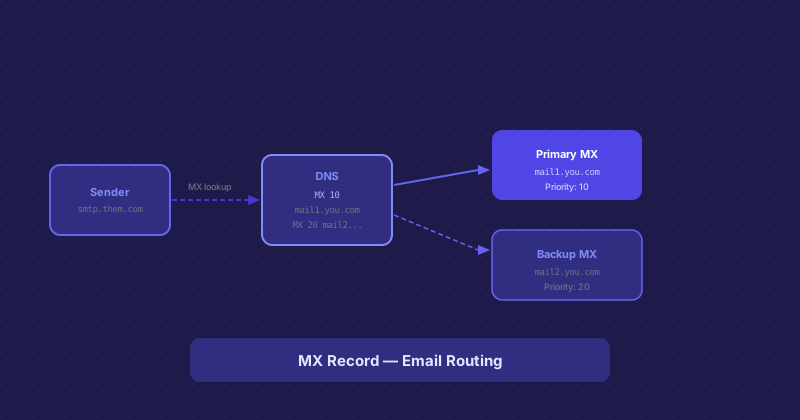
When someone sends an email to you@example.com, their mail server needs to know which server to deliver it to. It does not look up the A record for example.com. Instead it looks up the MX records. These are DNS records specifically for mail routing, and they point to hostnames (not IP addresses) of mail servers.
A typical MX record looks like: example.com MX 10 mail.example.com. The number (10) is the priority. Lower numbers have higher priority. The hostname (mail.example.com) must have its own A record pointing to an IP address.
MX Priority and Failover
You can have multiple MX records with different priorities. When the sending server tries to deliver email, it tries the lowest-priority-number (highest-priority) server first. If that is unavailable, it tries the next. This provides a basic failover: if your primary mail server is down, email queues on the sending side and is attempted at intervals, or routes to a backup MX if you have configured one.
For most setups using hosted email like Google Workspace or Microsoft 365, the provider gives you specific MX records to use. These often look like aspmx.l.google.com with specific priority values. You enter them exactly as provided.
What Happens When MX Records Are Wrong
If MX records point to a server that does not exist or is not accepting email, senders get a bounce. If they point to the old mail server after a migration, email keeps going to the old server. If they are missing entirely, some senders will attempt delivery to the A record as a fallback, but most will not — you will simply not receive email.
After any hosting migration or email provider change, the first thing to verify is that your MX records were updated and have propagated. Email problems after migrations are almost always an MX or propagation issue.
MX Records Do Not Control Outbound Email
MX records only control where incoming email is delivered. They have no effect on what you can send from your domain. Outbound email authentication is handled by SPF (a TXT record listing authorized sending servers), DKIM (a TXT record containing a public key), and DMARC (a TXT record defining a policy). Getting all three right is what keeps your outbound email out of spam folders.
Checking MX Records
From the command line, dig example.com MX shows your current MX records. Online tools like MXToolbox give you a more detailed view including whether the MX hostnames themselves resolve correctly, whether the mail servers are responding, and whether there are any obvious configuration problems.
It is worth running an MX check any time you change email providers, migrate hosting, or move nameservers. Catching a missing record before it affects real email is much better than diagnosing it after reports of missed messages start coming in.
Email at the Root Domain
Some organizations want email to arrive at support@example.com while the website is at www.example.com or app.example.com. MX records are set on the root domain regardless of where the web traffic goes. The MX records for your domain route email independently of the A records routing web traffic — they do not interfere with each other.