What Is an IP Range and Why Your Hosting Provider's Matters More Than You Think
When you rent a server or a hosting plan, you get an IP address. But that IP address does not exist in isolation — it belongs to a block of addresses allocated to your hosting provider. The reputation and history of that entire block affects you, and understanding why is important for anyone who cares about email deliverability, SEO mythology, security decisions, and the practical mechanics of how the internet assigns addresses.
How IP Addresses Are Organised
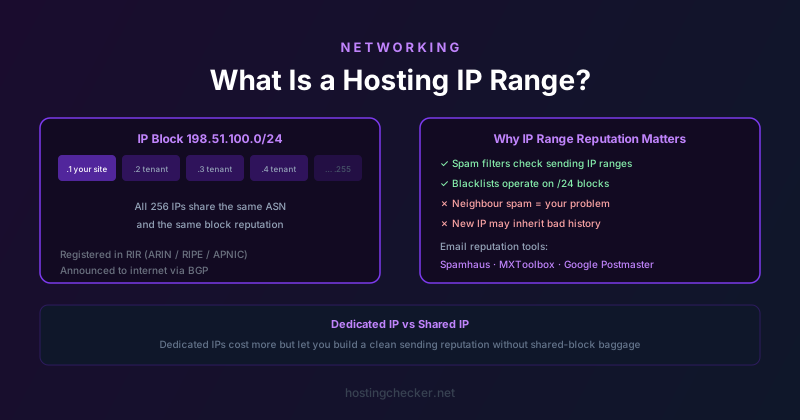
IPv4 addresses are 32-bit numbers, conventionally written as four groups of digits separated by dots, like 192.168.1.1. There are roughly 4.3 billion possible IPv4 addresses, and they are allocated in blocks called IP ranges or subnets. A hosting provider might own the block 198.51.100.0/24, which represents all 256 addresses from 198.51.100.0 to 198.51.100.255. The /24 notation is CIDR (Classless Inter-Domain Routing) notation, where the number after the slash indicates how many leading bits are fixed — a /24 fixes the first 24 bits, leaving 8 bits variable, which gives 256 addresses.
Larger providers own much larger blocks. A major cloud provider might own millions of IP addresses across many different ranges. These ranges are registered in a global database maintained by Regional Internet Registries (RIRs): ARIN for North America, RIPE NCC for Europe and the Middle East, APNIC for Asia-Pacific, LACNIC for Latin America, and AFRINIC for Africa. The RIR records show who owns each block, which is how IP lookup tools can tell you which company owns any given IP address.
Autonomous System Numbers and BGP
IP ranges are announced to the global routing system via BGP (Border Gateway Protocol), the protocol that glues the internet together. Each organisation that participates in internet routing has an Autonomous System Number (ASN), a unique identifier for their routing domain. A hosting provider's ASN is associated with all the IP ranges they announce, and routers around the internet use BGP announcements to learn how to reach those ranges.
This is why Hosting Checker and similar tools can tell you which provider hosts a website just from its IP address: they look up the ASN associated with the IP, and the ASN maps to a specific organisation. The IP range 104.16.0.0/12 announcing from Cloudflare's ASN is identifiably Cloudflare infrastructure, for example. The ASN lookup is the fundamental mechanism behind hosting detection tools.
Why Your IP Range's Reputation Matters for Email
Email spam filters make heavy use of IP reputation. If a sending IP address or its surrounding range has historically been used to send spam, that negative reputation affects all current occupants of the range — even if they have nothing to do with the previous behaviour. This is the shared-IP problem in a different form from shared hosting: your IP address's good standing depends partly on who else has used it, and who else is currently using addresses in the same range.
Major blacklist services like Spamhaus, SORBS, and Barracuda maintain lists of IP addresses and ranges known to send spam. If your hosting provider's range appears on these lists, your outbound email may be rejected or silently filtered by receiving servers before any content-based analysis even happens. Checking your IP against the major blacklists is one of the first diagnostic steps when email deliverability problems arise.
Cloud hosting providers with very large IP pools face this problem acutely. When a provider allocates a previously-used IP to a new customer, that customer may inherit a spam reputation they had nothing to do with. Major providers have processes for IP reputation rehabilitation and many maintain feedback loops with blacklist operators, but there is always some inherited history when you get a new IP from a large shared pool.
Why It Matters for Security
Intrusion detection systems, firewalls, and security services frequently use IP range analysis in their threat intelligence. An inbound connection from a range known to be associated with certain types of hosting (anonymous VPS providers popular with attackers, for example) may be treated with more suspicion than one from a residential ISP range. This is a probabilistic filter, not a definitive judgment, but it affects how your traffic is received.
Similarly, when you configure server firewall rules, you can block or allow traffic by IP range. If you know your legitimate users only come from certain regions, geo-IP based blocking of entire ranges from unexpected regions is a pragmatic way to reduce attack surface. The mapping from IP ranges to geographic regions is maintained by the RIRs and commercial geo-IP databases, and is generally accurate at the country level though less reliable at city or sub-regional level.
Shared vs Dedicated IPs in Context
On shared hosting, many customers share the same IP address. On VPS or dedicated hosting, you typically get an IP address that is yours for the duration of your contract, though it has been used by previous tenants. Dedicated IP addresses on shared hosting plans give you a dedicated IP while keeping the rest of the hosting infrastructure shared — this is sometimes marketed as beneficial for email sending or SSL certificates, though the latter benefit evaporated when SNI (Server Name Indication) made dedicated IPs unnecessary for HTTPS.
The real benefit of a dedicated IP for email is the clean history: if you can get an IP address that has not been used for email before, or that has a good reputation history, your email deliverability starts from a better position. The downside is cost: dedicated IPs carry an additional monthly fee from most hosting providers.
IPv6 and the Reputation Problem
IPv6 introduces a new dimension to this problem. IPv6 addresses are 128 bits long, meaning the address space is effectively unlimited — there are 340 undecillion possible IPv6 addresses. A single hosting provider might allocate an entire /48 subnet (about 1.2 quadrillion addresses) to a single customer, making IP-range-based reputation almost meaningless at scale. Spam filters have had to adapt their techniques for IPv6, focusing more on sending patterns, domain reputation, and content signals rather than IP reputation alone.
For hosting customers, IPv6 means that the range reputation problem is less severe for outbound email — the range is too large for historical behaviour to meaningfully pollute it. But many receiving mail servers still give more scrutiny to mail from IPv6 addresses that have no sending history, so a newly provisioned IPv6 address used for email needs to build its own reputation from scratch through consistent, policy-compliant sending behaviour.
How to Check Your IP Range's Reputation
The practical starting point is to look up your IP address in the major blacklist databases. MXToolbox's blacklist check and similar tools query dozens of blacklists simultaneously and report which ones have flagged your IP. The Spamhaus lookup at spamhaus.org is particularly important because Spamhaus lists are widely used by enterprise mail servers and major email providers.
Beyond blacklists, Google Postmaster Tools provides reputation data for domains and IPs that send volume to Gmail, which is the single most important receiving domain for most senders. If you are sending significant volume, setting up Postmaster Tools and monitoring the IP reputation dashboard there gives you a real-time window into how Gmail views your sending infrastructure.