What Is a Data Centre and Why Does It Matter Where Your Server Lives
Every server you rent from a hosting provider sits in a data centre somewhere. For most website owners, the data centre is invisible infrastructure — you pick a hosting plan, and somewhere in the background your files end up on hardware in a building you will never visit. But the location, quality, and infrastructure of that data centre has real effects on your site's performance and reliability. Understanding what a data centre actually is and how they differ makes hosting location choices less arbitrary.
What a Data Centre Is
A data centre is a facility purpose-built for housing and operating computer infrastructure at scale. The defining characteristic of a data centre compared to, say, a server in an office cupboard, is that it is engineered around reliability: redundant power supplies, redundant cooling systems, redundant network connections, physical security, and fire suppression systems. The goal is an environment where computer systems can run continuously without interruption from the mundane physical events that would otherwise stop them.
Data centres range from a single room in a colocation facility hosting a few dozen racks to massive campus-scale facilities owned by hyperscale cloud providers covering millions of square feet and consuming hundreds of megawatts of power. The largest data centres operated by Google, Microsoft, Amazon, and Meta are cities of computing infrastructure, with dedicated power substations, on-site water treatment, and workforces of thousands.
Power and Redundancy
Power is the most critical dependency in a data centre. Servers need continuous, stable power, and even a brief interruption can cause hardware failures, data corruption, and service outages. Professional data centres address this through multiple layers of redundancy. Utility power from the grid is the primary source. Uninterruptible Power Supplies (UPS systems) — large banks of batteries — provide immediate bridging power if grid power fails or fluctuates. Diesel generators, capable of running for days on fuel stored on-site, provide sustained power during extended grid outages.
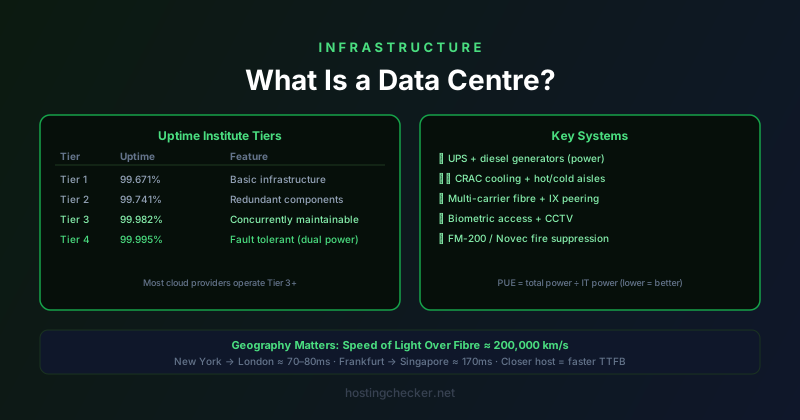
The Tier classification system developed by the Uptime Institute rates data centres on their redundancy architecture. Tier 1 has basic site infrastructure with 99.671% uptime. Tier 2 adds redundant components. Tier 3 is concurrently maintainable — components can be serviced without powering down. Tier 4 is fault tolerant, able to sustain a worst-case failure scenario with no impact on operations. Major cloud providers typically operate facilities at Tier 3 or higher, which is part of why managed cloud services can offer very high uptime SLAs.
Cooling
Servers generate substantial heat. A rack of servers might consume 10 to 20 kilowatts, all of which must be removed from the facility to prevent hardware damage. Cooling is therefore as critical as power, and data centres spend enormous engineering effort (and operational cost) on maintaining temperatures within the range that hardware can tolerate.
Traditional data centre cooling uses Computer Room Air Conditioning (CRAC) units that cool the air in the room. Modern high-density deployments often use hot aisle / cold aisle containment, where server racks face alternating directions so that cold air intake and hot exhaust air are separated. Some hyperscale facilities use liquid cooling or direct immersion cooling for the densest servers. Data centre operators measure cooling efficiency with Power Usage Effectiveness (PUE), the ratio of total power drawn by the facility to power used by IT equipment. A PUE of 1.0 would be perfect — all power goes to servers. Most modern data centres target PUEs between 1.1 and 1.5.
Network Connectivity
A data centre's network connectivity determines the bandwidth available for servers hosted there and the routes available to the rest of the internet. Premium data centres are directly connected to multiple major backbone providers (Tier 1 carriers) and often participate in internet exchange points, where many networks peer with each other for efficient traffic exchange. Being at a well-connected facility means lower latency to more of the internet and more redundancy in case any single network provider has an outage.
The quality of a data centre's network connectivity is not always obvious from the provider's marketing. You can get a sense of it by looking at BGP data: how many transit providers connect to the facility's network, whether it participates in local internet exchange points, and what the latency looks like to major destinations. Hosting providers operating in premium interconnected facilities typically advertise this as a selling point.
Geographic Location and Latency
The speed of light is not negotiable. The physical distance between your server and your users determines a floor for the round-trip latency they experience. Light travels through fibre optic cable at roughly two-thirds the speed of light in a vacuum, which is about 200,000 kilometres per second. A cable from New York to London covers roughly 5,500 kilometres, meaning the minimum one-way transit time is about 27 milliseconds. Real-world latency is higher due to routing, switching, and processing at intermediate points — typically 70 to 80 milliseconds between the US East Coast and Western Europe.
For a website whose visitors are predominantly in one region, hosting in that region is the obvious choice. For a global audience, a single server location means some users will have significantly higher latency than others. This is the primary use case for CDNs: by caching content in multiple geographic locations, a CDN serves cached responses from the location closest to each visitor, regardless of where the origin server is. CDNs address the latency problem for static content effectively; for dynamic content that cannot be cached, origin server placement and database location remain significant factors.
Multi-Region and Multi-Availability-Zone Deployments
Cloud providers divide their geographic coverage into regions (a geographic area like "US East") and availability zones (isolated data centres within a region, typically connected by low-latency private network links). Running your infrastructure across multiple availability zones protects against a failure in any single data centre within the region. Running across multiple regions protects against a regional failure — a natural disaster, regional power grid failure, or major network incident affecting an entire area.
Multi-region deployments introduce significant architectural complexity: databases must either be replicated across regions (with consistency trade-offs) or traffic must be routed to a single primary region for write operations. For most small to medium websites, single-region multi-AZ deployment is a proportionate level of redundancy. Multi-region is the right choice for applications where even regional-level outages are unacceptable — financial services, healthcare systems, and high-traffic consumer applications where downtime has immediate and significant business impact.