Beyond cPanel: Hosting Control Panels Compared and When You Don't Need One
For most of the history of web hosting, cPanel was so dominant that "hosting control panel" and "cPanel" were practically synonymous. That changed dramatically in 2019 when cPanel restructured its pricing, causing costs to rise sharply for hosting providers and prompting a wave of migration to alternatives. Understanding the landscape of hosting control panels — and when you might not need one at all — helps you make a more informed choice about your hosting setup.
What a Control Panel Actually Provides
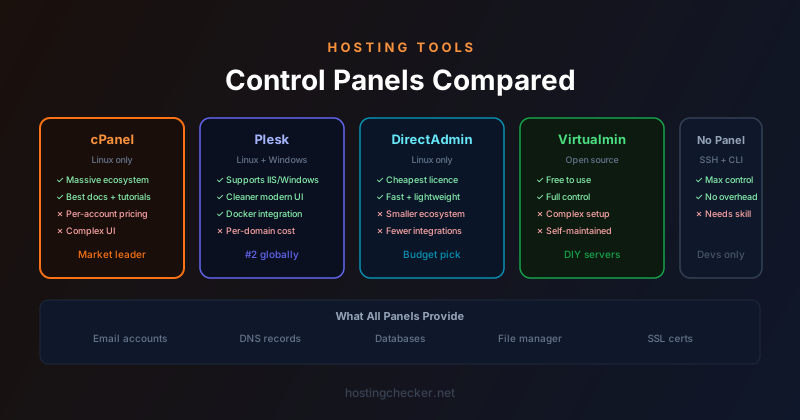
A hosting control panel is a web-based interface for managing server functions that would otherwise require direct command-line access and significant technical knowledge. The core functions are consistent across panels: creating and managing email accounts, managing domains and subdomains, configuring DNS records, managing databases (creating users, databases, and running queries), uploading and managing files, viewing server logs, managing SSL certificates, and configuring PHP settings.
Control panels exist primarily to make shared hosting accessible to users who are not comfortable with Linux administration. On a shared hosting server managed by a hosting provider, the panel provides a sandboxed view of the resources allocated to each customer account. On a VPS or dedicated server managed by the server owner, a panel replaces or supplements direct server administration, providing a GUI for tasks that would otherwise require SSH and command-line tools.
cPanel
cPanel remains the most widely used control panel, particularly in the US shared hosting market. Its ecosystem is mature: tens of thousands of hosting providers support it, documentation is plentiful, and virtually every shared hosting tutorial assumes cPanel is what you are using. cPanel runs on Linux servers and pairs with WHM (Web Host Manager) for reseller and server-level management.
The 2019 pricing change moved cPanel from a flat-fee model to a per-account fee. For hosting providers with large numbers of accounts on a single server, this significantly increased costs, which were passed through to customers or caused providers to switch alternatives. For end users, cPanel's interface has been modernised over the years but retains a density and complexity that newer users sometimes find overwhelming. The sheer number of features visible simultaneously can be intimidating when you only need a handful of them.
Plesk
Plesk is cPanel's most direct competitor and supports both Linux and Windows servers, which is its most significant differentiator. If you are running a Windows server with IIS, Plesk is essentially the only mainstream full-featured control panel option. On Linux, Plesk competes on its cleaner interface and its Docker and WordPress management integrations, which appeal to developers building modern applications rather than traditional shared hosting setups.
Plesk's pricing is also per-domain, with different tiers for different numbers of domains. It is widely supported by hosting providers as an alternative to cPanel, and migration tools exist for moving between the two. The interface is generally considered cleaner and more modern than cPanel, though both have been criticised for complexity as features accumulate over years of development.
DirectAdmin
DirectAdmin has gained significant market share since 2019 precisely because its pricing is considerably lower than cPanel's. It covers the essential shared hosting management functions (email, DNS, databases, files, SSL) and has a straightforward interface that is less feature-dense than cPanel. It lacks some of cPanel's more advanced features and has a smaller ecosystem of third-party integrations, but for hosting providers whose customers need core functionality rather than advanced features, it is a cost-effective choice.
DirectAdmin runs only on Linux and is generally considered easier to administer at the server level than cPanel. Its API is well-documented, which makes it amenable to automation. For providers building custom hosting products on top of a panel, DirectAdmin's more accessible architecture can be an advantage.
Virtualmin and Webmin
Webmin is an open-source server administration interface, and Virtualmin is a virtual hosting module built on top of Webmin. Together they provide most of the functionality of commercial panels for free. Virtualmin handles multi-domain virtual hosting with email, DNS, databases, and file management. Webmin handles the underlying server configuration in a GUI.
The trade-off with open-source panels is setup and maintenance complexity. Virtualmin is not typically pre-installed by hosting providers — it is something you install yourself on a VPS. Getting it configured correctly requires more initial effort than signing up for cPanel hosting, and the interface, while functional, is less polished than the commercial alternatives. For self-hosted server administrators who want a panel without licence fees, Virtualmin is a reasonable option. For customers on managed shared hosting, it is rarely an option because hosting providers do not typically offer it.
When You Do Not Need a Control Panel
Control panels made sense when server administration required deep Linux expertise and the people deploying websites were not administrators. That context has shifted considerably. Managed platforms like Kinsta, WP Engine, Cloudways, and Render provide their own purpose-built dashboards for deploying applications without a traditional control panel. Static site hosting through Netlify, Vercel, or Cloudflare Pages has no server to administer at all. Containerised deployments managed through Kubernetes or similar orchestration systems have their own management paradigms that control panels do not address.
For a developer who is comfortable with SSH, running a VPS without any control panel is entirely viable. Direct server administration gives you full flexibility: you choose your web server software, configure it exactly as you like, manage your own certificates with Certbot or acme.sh, administer databases directly, and automate everything with scripts. You give up the convenience of a GUI, but you gain complete control and eliminate a layer of software that itself has security vulnerabilities, consumes memory, and requires updates.
Security Considerations
Control panels are a significant attack surface. cPanel has had numerous security vulnerabilities over the years, some of them serious. Running a publicly accessible control panel on a server increases the number of entry points an attacker can probe. At minimum, control panel ports should be restricted by IP address where possible, using firewall rules to limit access to known IP ranges. Two-factor authentication should be enabled on all panel logins. Panel software should be kept up to date because security patches are released frequently.
Panels that manage DNS for your domains introduce another risk: if an attacker gains access to the panel, they can modify DNS records and redirect traffic. Ideally, DNS management should be handled at a separate provider with strong authentication rather than through a shared hosting panel where compromising one credential gives access to everything.