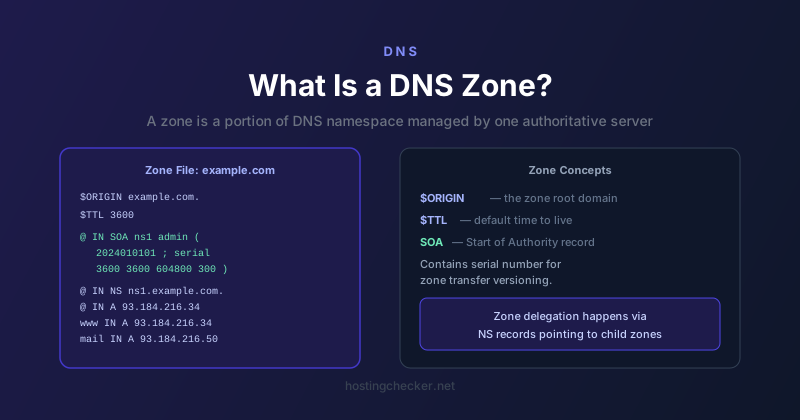
What Is a DNS Zone and How Does Zone Management Work?
When people start working with DNS more seriously, they encounter the concept of a DNS zone. The term shows up in control panels, in documentation for authoritative DNS servers, and in conversations about DNS architecture. Understanding what a zone actually is, and why the concept exists, makes working with DNS significantly less confusing.
The DNS Namespace Is a Tree
DNS is structured as a hierarchical tree. At the very top is the root, represented by a single dot. Below the root are the top-level domains: .com, .net, .org, .uk, and hundreds of others. Below each TLD are second-level domains like example in example.com. Below those are subdomains like www, mail, or api.
This tree structure is enormous. No single server can hold information about every domain. Instead, responsibility for different portions of the tree is distributed among many organisations and servers. A DNS zone is a specific portion of this namespace that has been delegated to a particular organisation or administrator to manage.
What a Zone Contains
A zone is defined by its zone file, a text file containing the resource records for the domain and its subdomains within that zone. A typical zone file starts with an SOA record that identifies the primary nameserver and the email address of the zone administrator. It then lists NS records pointing to the authoritative nameservers for the zone. After that come the actual resource records: A records, AAAA records, MX records, CNAME records, TXT records, and so on.
The SOA record includes a serial number that is incremented each time the zone changes. Secondary nameservers poll the primary periodically and compare serial numbers. If the primary has a higher serial number, the secondary fetches a copy of the updated zone. This mechanism is called a zone transfer.
Zone Boundaries and Delegation
A zone does not have to encompass all subdomains of a domain. If you manage example.com, you can delegate the subdomain api.example.com to a separate zone managed by a different team or infrastructure. You do this by adding NS records for api.example.com that point to the nameservers for that zone, and removing any records for api.example.com from the parent zone. DNS resolvers follow these NS records to find the authoritative server for the delegated zone.
This is exactly how the root zone delegates to TLDs: the root zone contains NS records for .com, .net, and all the other TLDs, pointing resolvers to the TLD registry nameservers. The .com zone in turn contains NS records for every .com domain, pointing to the domain owner authoritative nameservers.
Primary and Secondary Nameservers
Most DNS setups have at least two nameservers for redundancy. Traditionally there is one primary (also called primary master) and one or more secondaries (also called slaves in older documentation). The primary holds the definitive copy of the zone file. Changes are made on the primary. Secondaries receive copies via zone transfer.
Modern DNS services often blur this distinction. Services like Cloudflare or Route 53 operate multi-node distributed systems where the concept of a single primary is less meaningful. You make changes through an API or web interface and the changes propagate across their infrastructure globally, often within seconds.
Zone Files in Practice
If you are using a managed DNS service, you likely never see a raw zone file. You interact with the DNS through a web interface or API that abstracts the file format. But knowing the file format helps when you need to export or import DNS records, migrate between providers, or troubleshoot issues by looking at the underlying data.
The zone file format uses specific notation. The at symbol (@) represents the origin, meaning the domain name itself. A trailing dot on a hostname means it is a fully qualified domain name and the zone origin should not be appended. A hostname without a trailing dot has the zone origin appended automatically. Getting the trailing dots wrong is a classic source of misconfiguration errors when manually editing zone files.
Zone Signing with DNSSEC
DNSSEC adds cryptographic signatures to DNS records. When you enable DNSSEC on a zone, the zone signing process generates signatures for every record set in the zone using a private key. Resolvers that support DNSSEC can verify these signatures using the corresponding public key, which is published in the zone itself and anchored to the parent zone via a chain of trust going up to the root.
Zone signing is managed at the zone level. A zone that is DNSSEC-signed can delegate to a sub-zone that is also DNSSEC-signed, but the parent zone must publish DS records for the child zone to establish the chain of trust. Gaps in the chain break validation.