What Actually Happens When You Type a URL and Hit Enter
You type a URL, press Enter, and a webpage appears almost instantly. Between that keystroke and the rendered page, a surprisingly intricate sequence of events unfolds — most of it completing in well under one second. Here is the full breakdown.
Step 1: The Browser Parses the URL
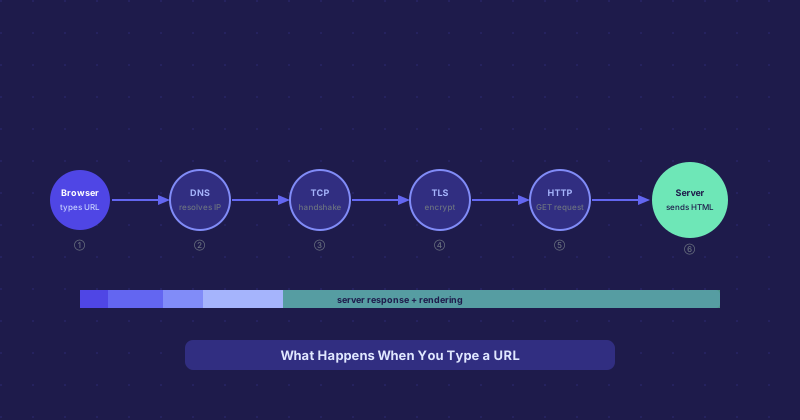
Before any network activity, the browser processes what you typed. It identifies the protocol (https://), hostname (example.com), path, and query parameters. If you typed without a protocol, the browser decides whether to treat it as a search query or attempt navigation. It also checks a preloaded HSTS list to determine if the connection must be forced to HTTPS.
Step 2: DNS Resolution
The browser needs an IP address. It checks its own DNS cache first, then the OS cache, then asks the configured DNS resolver. If nothing is cached, a full recursive lookup happens: a root nameserver points to the TLD nameserver, which points to the authoritative nameserver, which returns the IP. This process takes 20–120 ms the first time and is essentially instant for cached responses.
Step 3: TCP Connection
With the IP in hand, the browser opens a TCP connection via a three-way handshake — SYN, SYN-ACK, ACK. This establishes a reliable channel. Round-trip time depends on physical distance: a few milliseconds to a nearby server, 100+ ms across the world.
Step 4: TLS Handshake
For HTTPS sites, a TLS handshake immediately follows. Browser and server negotiate TLS version and cipher suite, exchange certificates, and establish session keys for encrypting everything that follows. TLS 1.3 does this in one round trip instead of two, meaningfully reducing setup time. By the end, the browser has verified it is talking to the genuine server.
Step 5: The HTTP Request
The browser sends an HTTP GET request with the path, headers including the Host, accepted content types, accepted encodings (gzip, brotli), and any cookies for the domain. The entire request is usually a few hundred bytes.
Step 6: Server Processing
The web server receives the request and decides what to do — serve a static file, check a cache, or pass the request to an application server. For a dynamic site, this involves database queries and template rendering. For a cached static page, it just reads a file from disk. This is where most of the latency for slow sites lives.
Step 7: Response and Rendering
The server sends back a status code, headers, and the HTML body. The browser starts processing as data arrives without waiting for the full document. As it parses HTML and finds references to stylesheets, scripts, and images, it fires additional requests for each. It builds a DOM, a CSSOM, combines them into a render tree, calculates layout, and paints pixels. The first meaningful content typically appears within 1–3 seconds on a well-optimized site.
The Full Timeline
For a typical cached visit to a well-optimized site: DNS under 5 ms, TCP handshake 20–40 ms, TLS handshake another 20–40 ms, server response 50–150 ms, rendering 100–500 ms. Total time to a usable page is often 200–800 ms. HTTP/2 and HTTP/3 improve this further by multiplexing requests over a single connection, cutting the overhead of loading many assets in parallel.