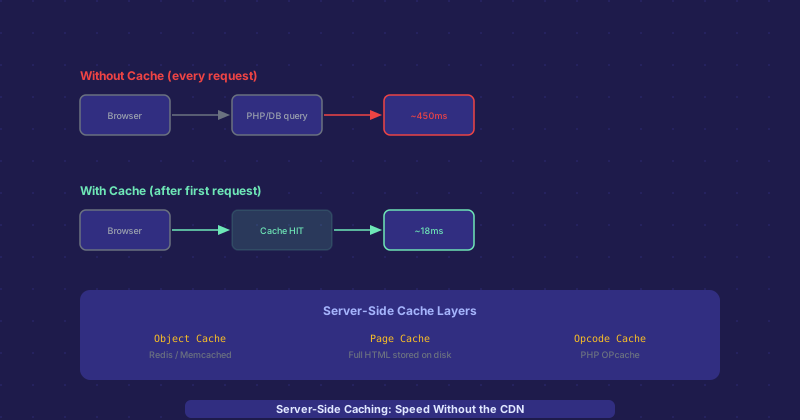
Server-Side Caching Explained: How Your Host Speeds Up Pages Before They Reach a CDN
Most performance conversations jump straight to CDNs, but the fastest request is one that never has to run the application code in the first place. Server-side caching is what makes that possible. Here is how the different layers work and how they interact.
Why Server-Side Caching Exists
A dynamic website generates each page by running code — querying a database, processing templates, applying business logic. This work takes time. For a WordPress site on modest hosting, a cold page load might take 300–800 ms just for the PHP execution and database queries. If the same page is requested a thousand times an hour and nothing changes between requests, running that code a thousand times is wasteful. Server-side caching stores computed results and serves them directly for subsequent requests.
PHP OPcache: Compiled Code Cache
PHP is an interpreted language — normally, every request reads PHP files from disk, parses them into an abstract syntax tree, compiles them to bytecode, and executes them. OPcache eliminates the first three steps by storing the compiled bytecode in memory. Subsequent requests skip the file reading, parsing, and compilation phases entirely and go straight to execution. This alone typically reduces PHP execution time by 30–50% on most applications. OPcache is built into PHP 5.5+ and should be enabled by default on any reasonably configured hosting environment.
Object Cache: Database Query Results
Even with OPcache, a database-heavy page still runs queries on every request. Object caching stores the results of expensive database queries or computation in memory, typically using Redis or Memcached. When the application needs data, it checks the object cache first. Cache hit: data returned from memory in under 1 ms. Cache miss: database query runs, result stored in cache for the next request.
WordPress with Redis object cache using a plugin like Redis Object Cache Pro can reduce database queries per page from 50–100 down to single digits, transforming a 400 ms page to 40 ms.
Page Cache: Full HTML Output
Page caching goes further than object caching — it stores the complete rendered HTML output of a page. When a cached page is requested, the web server serves the pre-rendered HTML file directly, bypassing PHP entirely. The response time drops from hundreds of milliseconds to the time it takes to read a file from disk and send it — often under 10 ms.
On Apache and nginx, page caching is implemented by WordPress cache plugins (WP Super Cache, W3 Total Cache, WP Rocket) that write HTML files to disk, combined with server configuration that serves those files directly. On managed WordPress hosts, the page cache is built into the infrastructure at the nginx level.
Cache Invalidation: The Hard Part
Cached content needs to be invalidated when the underlying data changes. If you publish a new blog post, the cached homepage and archive pages need to be purged. If you update a product price, the cached product page needs to be regenerated. Most caching plugins handle this automatically for common WordPress actions — publishing, updating, or deleting content triggers cache purges for affected pages. But custom functionality may require manual cache purge calls after data changes.
Getting invalidation wrong leads to the most common caching problem: stale content being served to users. Someone sees an old price, reads outdated information, or misses content that was just published. Most systems handle this with a combination of automatic event-based purging and TTL-based expiry as a fallback.
Server Cache vs. CDN Cache
Server-side caching reduces load on your application and database. CDN caching reduces load on your origin server entirely by serving content from edge nodes close to users. They are complementary, not alternatives. The typical flow: browser request hits CDN edge, if cached serve immediately, if not fetch from origin, origin serves from page cache or generates the page, CDN caches it, browser receives it. Both layers benefit from the other being present.