Reverse DNS Lookup: What It Is and Why Mail Servers Care About It
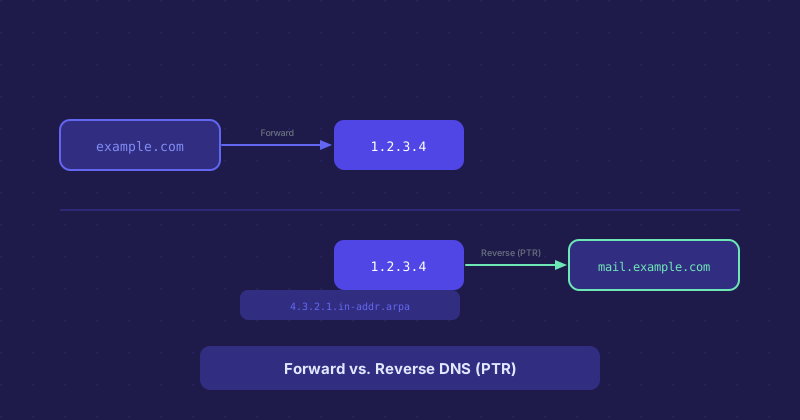
Most people are familiar with forward DNS: you look up a domain name and get back an IP address. Reverse DNS works the other way. You start with an IP address and look up the hostname associated with it. The technical term for this is a PTR record.
How Reverse DNS Works
The DNS system stores reverse lookup records in a special zone called in-addr.arpa. An IP like 192.0.2.5 is represented as 5.2.0.192.in-addr.arpa — the octets reversed, plus the arpa suffix. A PTR record at that address points back to a hostname like mail.example.com.
Who controls these records? Unlike forward DNS records which you manage yourself, PTR records are controlled by whoever owns the IP block — usually your hosting provider or ISP. To set a reverse DNS record, you typically go into your hosting control panel and set a "reverse DNS" or "PTR record" entry for your server's IP, or open a support ticket asking them to set it.
Why Email Servers Care About PTR Records
When a mail server receives an incoming email, one of the first things it checks is whether the sending IP has a valid reverse DNS record, and whether that PTR hostname matches the forward DNS of the sending domain. This is called a forward-confirmed reverse DNS check (FCrDNS).
If a server is sending email from IP 203.0.113.42 and that IP has no PTR record, or the PTR record points to something that looks like a residential IP or generic hosting hostname, many mail servers will reject the email outright or route it to spam. This is one of the most common causes of email deliverability problems on new servers.
Setting Up Reverse DNS for a Mail Server
The PTR record for your mail server's IP should resolve to the hostname you use in your mail server's EHLO/HELO greeting. That hostname should forward-resolve back to the same IP. Anything that breaks this chain is a red flag to receiving mail servers.
For example: your server sends mail from IP 198.51.100.10. Your PTR record for that IP should say something like mail.example.com. And mail.example.com should have an A record pointing to 198.51.100.10. Close the loop.
Reverse DNS for Non-Mail Uses
Network diagnostics use reverse DNS constantly. When you run a traceroute, the hostnames you see next to each hop are reverse DNS lookups. Server logs often show PTR records instead of raw IPs. Security tools use PTR records to identify whether an IP belongs to a known hosting provider, ISP, or suspicious range.
If you are running any kind of server — not just a mail server — having a clean PTR record that identifies your server is good practice. It makes your server easier to identify in logs and less likely to be flagged by automated security tools that distrust IPs with no reverse DNS.
How to Check a PTR Record
On Linux or macOS, dig -x 192.0.2.5 performs a reverse lookup. On Windows, nslookup 192.0.2.5 does the same. Online tools like MXToolbox and various DNS lookup tools also support reverse lookups. If the result comes back with no PTR record, that is something worth fixing if you are running a mail server.