PTR Records Explained: Why Reverse DNS Matters More Than You Think
Most people who work with DNS know about A records (hostname to IP) and MX records (email routing). PTR records are less commonly discussed, but they are critical for one specific use case that catches a lot of people off guard: outbound email delivery.
What a PTR Record Is
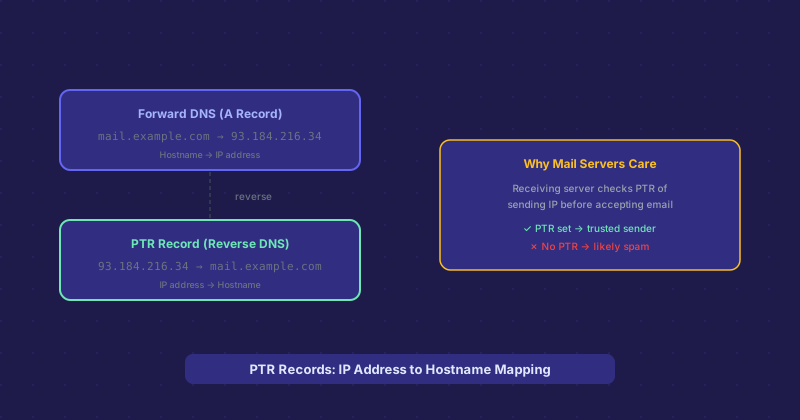
A PTR (Pointer) record maps an IP address to a hostname — the reverse of what an A record does. While an A record says "this hostname points to this IP," a PTR record says "this IP resolves to this hostname." This is why they are also called reverse DNS records.
PTR records live in a special zone of the DNS hierarchy under in-addr.arpa for IPv4. The IP address is written in reverse followed by .in-addr.arpa. So the PTR record for 93.184.216.34 lives at 34.216.184.93.in-addr.arpa. IPv6 PTR records work similarly under ip6.arpa.
Who Controls PTR Records
This is the part that trips people up: you cannot set PTR records yourself through your domain registrar or DNS provider. PTR records are controlled by whoever owns the IP address block — your hosting provider or ISP. If you want a PTR record set for an IP on your server, you have to ask your hosting provider to create it, or use a control panel feature they provide for this purpose. Many VPS providers (DigitalOcean, Linode, Vultr) let you set the PTR record directly from your dashboard, but not all shared hosting providers expose this option.
Why Email Servers Care About PTR Records
When a receiving mail server gets an inbound email connection, one of its first checks is reverse DNS on the sending IP. The mail server looks up the PTR record for the IP, and then looks up the A record for the hostname that comes back. If the forward and reverse DNS match — a configuration called forward-confirmed reverse DNS (FCrDNS) — the sending server gains credibility. If there is no PTR record, or if the PTR hostname does not resolve back to the sending IP, the receiving server flags the message as potentially spam.
Major mail providers — Gmail, Outlook, Yahoo Mail — use this as one of many signals in their spam filtering. Missing PTR records are a reliable indicator of bulk spam senders using dynamically assigned IPs, so their absence is weighted negatively. If you spin up a new VPS and try to send email from it without setting a PTR record, expect those emails to land in spam or be rejected outright.
Setting Up PTR Records Correctly
The PTR record for your mail server IP should resolve to the hostname your mail server uses as its EHLO/HELO name — typically something like mail.yourdomain.com. And that hostname should have an A record pointing back to the same IP. So the chain is: mail.yourdomain.com A record → 1.2.3.4, and 1.2.3.4 PTR record → mail.yourdomain.com. The forward and reverse agree.
PTR Records and Spam Reputation
PTR records are just one part of email deliverability. A properly set PTR record does not guarantee your emails reach the inbox — you also need SPF, DKIM, DMARC, a clean sending reputation, and low complaint rates. But a missing or incorrect PTR record is a quick disqualifier that will hurt deliverability regardless of how well everything else is configured. Fix it first.
Beyond Email: Network Diagnostics
PTR records also show up in network diagnostic tools. When you run a traceroute or tracepath, the hostnames of intermediate routers often come from PTR lookups — that is why you sometimes see meaningful names like core1.nyc.example-isp.net in a traceroute instead of just IP addresses. System administrators use PTR records to make network infrastructure readable in logs and monitoring tools.