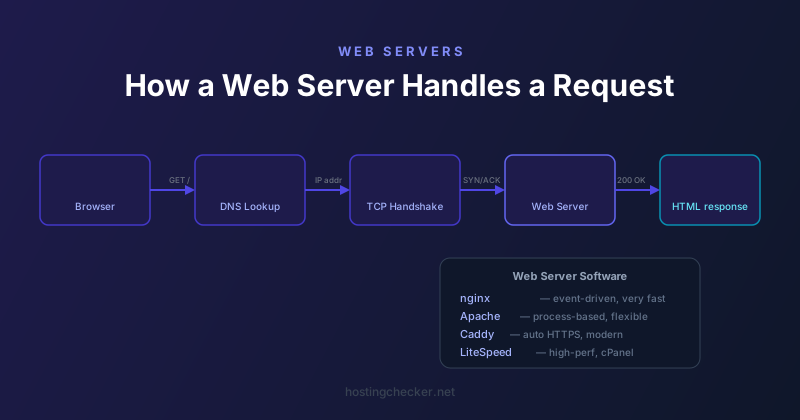
How Web Servers Handle Requests: nginx, Apache, and the Request Lifecycle
Every time you type a URL and press enter, a complex sequence of events happens in milliseconds. Understanding this sequence, and how the web server at the end of it actually processes your request, gives you a clearer mental model for debugging performance problems and making infrastructure decisions.
Step 1: DNS Resolution
Before a TCP connection can be established, the browser needs to find the IP address for the domain. It checks its own cache first, then the operating system cache, then queries a recursive DNS resolver. The resolver works through the hierarchy, querying root servers, TLD servers, and finally the authoritative nameservers for the domain, until it gets an answer. The whole process usually takes between 1 and 100 milliseconds depending on caching and network conditions.
Step 2: TCP Connection
With an IP address in hand, the browser initiates a TCP three-way handshake. The client sends a SYN packet. The server responds with SYN-ACK. The client acknowledges with ACK. This takes one round-trip time, which on a modern broadband connection to a nearby server might be 10 to 30 milliseconds.
For HTTPS connections, TLS negotiation happens after the TCP handshake. The client and server agree on cipher suites, exchange certificates, and establish encryption keys. With TLS 1.3, this adds just one round trip on top of the TCP handshake. With TLS 1.2, it was two additional round trips.
Step 3: The HTTP Request
Once the connection is established, the browser sends an HTTP request. This is a text document (or binary for HTTP/2) that includes the request method (GET, POST, etc.), the path, the HTTP version, and a collection of headers including the Host header that tells the server which domain is being requested. The Host header is essential on shared hosting where many domains share one IP address.
Step 4: Server Processing
The web server receives the request and needs to figure out what to do with it. For a static file like an HTML page, image, or JavaScript file, it reads the file from disk and sends it back. For a dynamic request handled by PHP, Python, or another language, it passes the request to the appropriate process or interpreter, waits for a response, and returns it to the browser.
How nginx Handles This
nginx uses an event-driven, asynchronous architecture. A small number of worker processes, typically one per CPU core, each handle thousands of simultaneous connections using non-blocking I/O. When waiting for disk reads or upstream responses, a worker does not sit idle. It handles other requests in the meantime. This makes nginx extremely memory-efficient and very fast under high concurrency. It is well suited to serving static content and acting as a reverse proxy in front of application servers.
How Apache Handles This
Apache has traditionally used a process-based or thread-based model. The prefork MPM (Multi-Processing Module) creates separate processes for each connection. The worker MPM uses threads instead. Each process or thread handles one request at a time, meaning that a server handling 500 simultaneous connections needs 500 processes or threads, which consumes significantly more memory than nginx for the same workload.
Apache has an event MPM that is closer to nginx architecture for handling keep-alive connections, but its fundamentally process-based heritage means it typically uses more RAM under load. Apache compensates with flexibility: its .htaccess files allow per-directory configuration without server restarts, and its module ecosystem is enormous. Shared hosting environments tend to favour Apache precisely because .htaccess allows tenants to configure their own URL rewrites and redirects without touching the main server configuration.
Step 5: The Response
The server sends back an HTTP response consisting of a status line (200 OK, 404 Not Found, 301 Moved Permanently, etc.), response headers including Content-Type, Content-Length, caching directives, and any cookies, and then the response body: the HTML, JSON, image data, or whatever was requested.
Connection Reuse and HTTP/2
Modern browsers reuse TCP connections for multiple requests to the same server. In HTTP/1.1 this is called keep-alive. In HTTP/2, multiplexing means a single connection can handle many requests simultaneously. This dramatically reduces the connection setup overhead for pages that load many resources from the same origin.
Where the Time Goes
When debugging slow pages, understanding the lifecycle helps identify where the time is actually going. DNS latency is usually small but can be significant for users on mobile or in regions far from good resolvers. TCP and TLS handshake latency is proportional to the distance to the server, which is why server location and CDN usage matter. Time to First Byte (TTFB) reflects server processing time. Content download time reflects page size and connection bandwidth.