How Web Hosting Uptime Monitoring Works: What Gets Measured and What Gets Missed
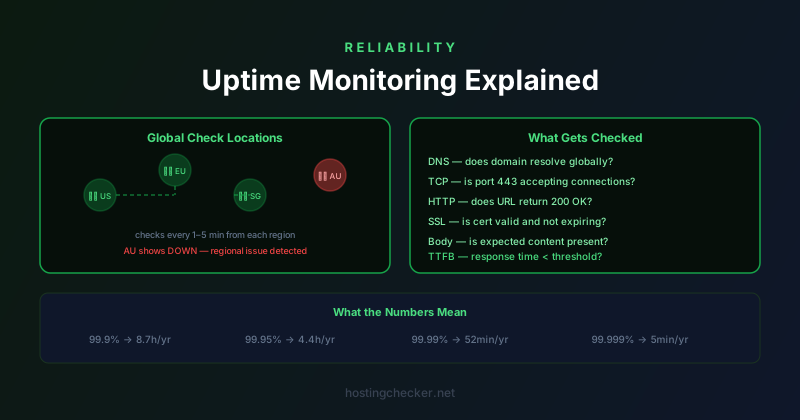
Every hosting provider advertises an uptime percentage. Most site owners know that 99.9% uptime means about 8.7 hours of downtime per year. What fewer people think about is how uptime is actually measured — by the provider, and independently by the site owner. The difference between these two perspectives is significant, and understanding how monitoring actually works changes how you think about reliability.
What "Uptime" Actually Measures
Uptime is the proportion of time a system is available and functioning correctly. The deceptively simple question is: what counts as "functioning correctly"? A server that responds to a TCP connection on port 80 but returns a 500 Internal Server Error for every request is technically "up" by some definitions but completely broken from a user perspective. A server that serves the homepage correctly but whose database is down will return errors for any page that requires database queries.
Good uptime monitoring defines availability at the application layer, not just the network layer. A 200 OK response from the correct URL is meaningful availability. A TCP connection that succeeds tells you the server process is listening. An ICMP ping response tells you the machine is reachable on the network. Each measure captures a different layer of the stack and each can give false positives from the perspective of the user actually trying to use the site.
How Hosting Providers Measure Their Own Uptime
Hosting providers typically measure uptime from their own infrastructure. Their monitoring tools check whether their servers are reachable from within their network, or from a handful of monitoring points they control. This approach has a significant limitation: it does not capture problems that affect user-facing connectivity while leaving the host's internal monitoring unaffected.
A network outage between the hosting provider's data centre and a major ISP, for example, might prevent users in a certain region from reaching the site while the host's own monitoring, running from inside the same network, sees no problem. A DNS provider outage might make the domain unresolvable for millions of users while the server itself is perfectly healthy. Neither of these events would affect the host's internal uptime metrics, but users experience them as downtime.
This is why uptime guarantees in SLAs are often defined in terms that benefit the provider. Scheduled maintenance windows are excluded. Downtime caused by third-party service dependencies may be excluded. The window during which you must report a problem to claim SLA credit may be shorter than the actual outage. Understanding the exact terms of any SLA before relying on it matters.
External Uptime Monitoring
Independent uptime monitoring services check your site from multiple locations around the world on a regular schedule. Services like UptimeRobot, Better Uptime, Pingdom, and StatusCake operate monitoring infrastructure in many different geographic regions and network providers, and check your URL every minute or five minutes from each location. An outage that only affects one region is visible in the data. A global outage shows up across all monitoring locations simultaneously.
Most of these services offer a free tier that checks a small number of URLs every five minutes. That interval means you can miss outages shorter than five minutes, or catch an outage three to four minutes after it starts. Paid tiers offer one-minute checks, which reduces the detection gap but still cannot guarantee instant detection. Services that offer 30-second or 15-second checks exist for applications where even brief outages are significant.
What to Check: Layers of Monitoring
A comprehensive monitoring setup checks multiple layers. DNS monitoring verifies that your domain resolves correctly from multiple resolvers around the world. DNS outages are surprisingly common and often caused by problems at the DNS provider rather than the web server. If your domain stops resolving, users see a connection error rather than your site, and a basic HTTP check will not tell you whether the problem is DNS or the server itself.
SSL certificate monitoring checks the validity and expiry date of your certificate. An expired certificate does not cause your server to go down, but it causes browsers to show a security warning that most users will not click through, which has the same practical effect as downtime. Monitoring tools can alert you when a certificate is 30, 14, or 7 days from expiry, giving you time to renew before any disruption occurs.
HTTP status code monitoring checks that your URL returns a 200 OK (or an expected redirect) rather than an error code. Checking for a specific string in the response body goes one step further and verifies that the correct content is being served, not just that the server is returning some response. This distinction matters when a server is running but returning a cached error page, a maintenance page, or the default server configuration page instead of your site.
Response Time Monitoring
Uptime monitoring tracks availability, but performance monitoring tracks whether the site is acceptably fast. A site that responds in 15 seconds is technically "up" but effectively broken for most users. Response time monitoring captures the time from when the monitoring request is sent to when the full response is received, giving you a baseline and alerting you when response times exceed a threshold.
Response time data from multiple geographic locations also gives you information about where your site is fast and where it is slow. If your server is in Frankfurt and your response time monitoring shows 50ms from Frankfurt, 120ms from London, 280ms from New York, and 450ms from Singapore, that geographic pattern is expected and tells you that visitors far from your server will experience meaningfully slower loads. This is the data that makes the case for using a CDN or placing servers closer to your user base.
Alerting: Getting the Right Signals
A monitoring system that detects problems is only useful if it tells someone quickly. Alerting should be sensitive enough to catch real problems but specific enough to avoid alert fatigue. Checking from multiple locations before triggering an alert reduces false positives from transient network issues. Requiring a check to fail from at least two of five monitoring locations before alerting means a single flaky monitoring node does not wake someone up at 3am.
Alert routing matters as much as alert thresholds. An SMS or phone call for complete downtime, an email for high response times, and a weekly report for trends treats different severity levels differently. Too many low-severity alerts trained on-call staff to ignore the monitoring system, which defeats its purpose. Keeping the alert-to-action ratio high — meaning most alerts represent real problems worth acting on — preserves the value of the monitoring signal.
Status Pages and Incident Communication
Status pages are the external-facing component of an uptime monitoring strategy. A status page hosted on separate infrastructure from your main site shows current system status and historical incident information. If your main site goes down, a status page hosted elsewhere remains accessible, giving users a place to check what is happening. Services like Atlassian Statuspage, BetterUptime, and Instatus provide hosted status pages that integrate with monitoring tools and allow you to post incident updates as events unfold.
Communicating clearly during incidents — acknowledging the problem promptly, providing updates as the investigation progresses, and posting a post-mortem after resolution — builds user trust even in failure situations. Users are generally more forgiving of outages that are communicated transparently than of outages that disappear into silence. A status page with a history of resolved incidents actually builds confidence, because it demonstrates that problems are detected, addressed, and documented.