DNS Propagation: Why Your Site Looks Different on Different Devices
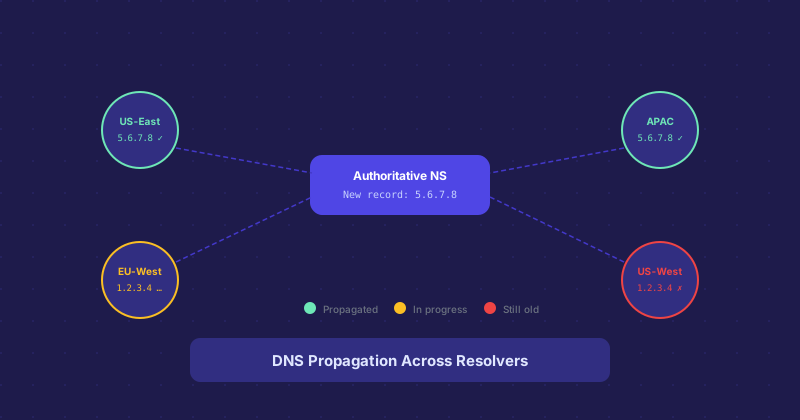
You update a DNS record and check your site — it shows the new version. Your colleague checks the same site and still sees the old version. You try on your phone and it looks different again. This is DNS propagation in action, and it is not a bug or a mistake. It is how the DNS system works.
Why Propagation Exists
The global DNS system relies on caching to be fast. Without caching, every DNS query would travel all the way to the authoritative nameserver for the domain — a chain of lookups that would take too long to be practical. Instead, resolvers at your ISP, in your office, and on major public DNS services (8.8.8.8, 1.1.1.1) cache records and answer from cache.
When you change a DNS record, your authoritative nameserver serves the new record immediately. But every resolver that has cached the old record will keep serving that cached value until the TTL expires. How long that takes depends on what TTL was set on the record when it was last cached.
Why Two People See Different Things
Your device queries a specific DNS resolver — usually your ISP's or a public resolver. Your colleague's device queries a different one. If their resolver cached the old record more recently, it still has it. If yours cached it earlier and the TTL has since expired, it fetched the new record on the next query. Two devices, two resolvers, two points in the cache lifecycle — different results.
How to Check Propagation from Multiple Locations
Rather than guessing based on what you see locally, use a global DNS propagation checker. These tools query nameservers from dozens of locations around the world and show you what each one returns. You can see at a glance which regions have the new record and which are still serving the old one.
You can also do this manually with command-line tools. dig @8.8.8.8 example.com A queries Google's resolver. dig @1.1.1.1 example.com A queries Cloudflare's. Comparing the outputs tells you whether the two major public resolvers have picked up the change.
Flushing Local DNS Cache
Your own device also caches DNS. Even if the global resolver has the new record, your local cache might still have the old one. To flush the local DNS cache:
- Windows:
ipconfig /flushdnsin Command Prompt - macOS:
sudo dscacheutil -flushcache; sudo killall -HUP mDNSResponder - Linux: depends on the resolver, but
systemd-resolve --flush-cachesworks on most modern systems - Chrome: navigate to
chrome://net-internals/#dnsand click "Clear host cache"
How to Speed Up Propagation
You can make future propagation faster by lowering TTLs before you plan to make changes. Lower the TTL to 300 seconds (five minutes) a day or two before the planned change. After the old cached records have expired and resolvers are fetching with the new low TTL, make your change. With a 5-minute TTL, propagation is effectively done within minutes rather than hours.
Once the change is confirmed globally, raise the TTL back to a higher value to reduce DNS query load.
When "Full Propagation" Takes Longer Than Expected
Occasionally a resolver ignores TTL and caches longer than specified. Some aggressive caching configurations, particularly in enterprise environments and some ISPs, override TTL with their own minimums. There is not much you can do about this from the outside. Most of the internet will have your new record within an hour for typical TTL values, but outliers can persist for longer.