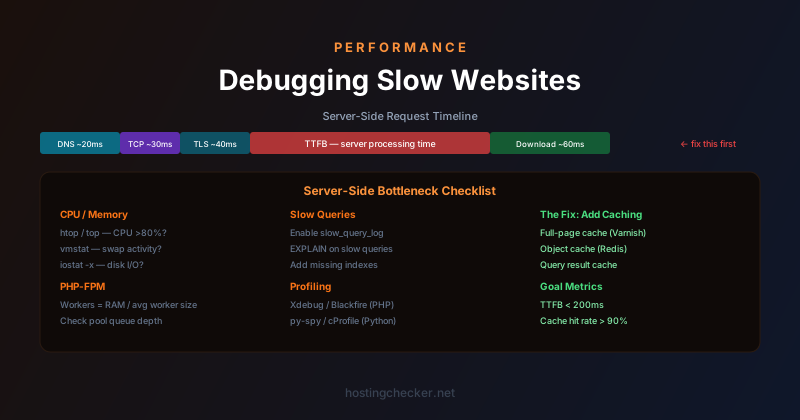
How to Debug a Slow Website: Finding the Bottleneck on the Server Side
A slow website hurts users and rankings. But "my website is slow" is a symptom, not a diagnosis, and the causes are diverse: an undersized server, slow database queries, inefficient application code, a missing cache, a CDN misconfiguration, or an overloaded shared host. Debugging server-side performance means narrowing down which layer is responsible, because different causes require completely different fixes.
Start with Time to First Byte
Time to First Byte (TTFB) is the time from when the browser sends an HTTP request to when it receives the first byte of the response. It is the purest server-side performance metric — network latency and content download time are excluded. A TTFB under 200ms is generally good. Anything over 500ms suggests a server-side bottleneck worth investigating. Chrome DevTools, WebPageTest, and similar tools all report TTFB.
TTFB captures everything that happens on the server: DNS resolution (if not already cached), TCP handshake, TLS negotiation, and then the server's actual processing time. To isolate the server processing time specifically, measure TTFB from a server or testing tool in the same region as your server, which eliminates network latency from the measurement. A high TTFB measured from a local tool points clearly to a server-side problem.
Check Server Resource Utilisation
The first diagnostic check on any slow server is resource utilisation. High CPU usage (above 80-90% sustained), high memory usage causing swap activity, or disk I/O saturation are all signs that the server is overloaded relative to the work it is being asked to do. On a Linux VPS, top or htop shows real-time CPU and memory usage by process. iostat -x 1 shows disk I/O statistics including whether the disk is saturated. vmstat 1 shows swap activity (si and so columns indicating swap reads and writes are a clear sign of memory pressure).
If CPU is the bottleneck, the question is which process is consuming it. PHP workers, database queries, background jobs, and log processing are all candidates. If memory is the bottleneck, look for memory leaks in long-running processes, oversized PHP-FPM pools, or database buffer pools configured beyond available RAM. Disk I/O bottlenecks on spinning drives are common on low-cost VPS plans and can be dramatically improved by moving to SSD-backed storage or by reducing unnecessary disk I/O through caching.
Slow Database Queries
Database queries are the most common source of server-side slowness in web applications. A single unindexed query on a large table can take seconds. A request that triggers dozens of small queries has cumulative overhead that adds up. Identifying slow queries requires enabling slow query logging on the database.
MySQL and MariaDB can log all queries that exceed a threshold duration: slow_query_log = 1 and long_query_time = 0.1 in the database configuration will log all queries taking more than 100 milliseconds. The slow query log shows the query text, execution time, and row counts — the information needed to understand why a query is slow. EXPLAIN or EXPLAIN ANALYZE run against a specific query shows the query execution plan: whether it is doing a full table scan or using an index, and where the work is going.
Missing indexes are the most common cause of slow queries. A query that filters on a column without an index must scan every row in the table. Adding an index on the filter column reduces this to a targeted lookup in a fraction of the time. The trade-off is write overhead (indexes must be updated when rows are inserted or modified) and storage space, both of which are almost always worth it when the alternative is full table scans on large tables.
Application-Level Profiling
When the bottleneck is not simple resource exhaustion or a single obvious slow query, application profiling tools help identify where time is spent within the application code itself. PHP has Xdebug and Blackfire for profiling. Python has cProfile and py-spy. Node.js has the built-in V8 profiler. Ruby has rack-mini-profiler.
Profiling tools produce call graphs or flame graphs showing which functions are called, how often, and how long they take. The output frequently reveals surprises: a function that is called thousands of times per request because it was placed inside a loop, a serialisation operation consuming more CPU than expected, or an external HTTP call blocking the response for hundreds of milliseconds. Profiling under realistic load (using a load testing tool to generate representative request patterns while profiling) is more revealing than profiling a single request in isolation.
PHP-FPM and Worker Configuration
PHP applications served through PHP-FPM can be slow or unstable if the pool configuration is wrong. Too few worker processes means requests queue up waiting for a free worker when traffic spikes. Too many worker processes means each worker consumes PHP's memory allocation, and if total memory consumption exceeds available RAM the server begins swapping, which is far more expensive than the original queuing.
The right PHP-FPM pool size depends on how much memory each PHP worker uses (measure with ps aux | grep php-fpm) and how much RAM is available for PHP workers after subtracting the database buffer pool, web server processes, and operating system overhead. A common starting formula is: number of workers = (available RAM for PHP) / (average PHP worker memory usage). Monitoring the PHP-FPM pool status page shows queue depth and active worker count under real load, allowing you to tune the pool size iteratively.
Caching: The Most Impactful Fix
For many slow applications, the highest-impact fix is not optimising existing code but adding caching at the right layer. Page-level caching (serving a pre-rendered HTML page directly without executing any PHP or database queries) can reduce response times from hundreds of milliseconds to a few milliseconds. Object caching with Redis or Memcached stores the results of expensive database queries or computations so they do not need to be repeated on every request. Full-page caches like Varnish sit in front of the application server and serve cached responses for anonymous (non-logged-in) traffic entirely.
The right caching strategy depends on the application's data model: how often content changes, whether responses vary by user, and what the acceptable staleness window is. For content sites (blogs, documentation, marketing pages), full-page caching is often appropriate and provides the largest performance improvement. For application pages that vary by user or change frequently, object caching of expensive sub-components is more targeted. Measuring the cache hit rate after implementing caching confirms whether it is actually reducing database load — a 90% cache hit rate for the most expensive queries is the goal.