How to Properly Benchmark Your Website Speed (and What the Numbers Mean)
Almost every website owner has pasted their URL into Google PageSpeed Insights at some point. The problem is that a score between 0 and 100 does not tell you much about what to fix or whether the changes you make are actually working. Here is how to benchmark properly.
Why Single-Point Tests Are Misleading
Speed varies by location, time of day, network conditions, and what is cached. A single test run at one moment from one location is a snapshot, not a benchmark. Before drawing any conclusions, run multiple tests, test from multiple geographic locations, and compare results across different days or times. Variance in results often tells you something important — inconsistent results suggest caching or server behavior issues that consistent results would mask.
Core Web Vitals: The Metrics That Matter
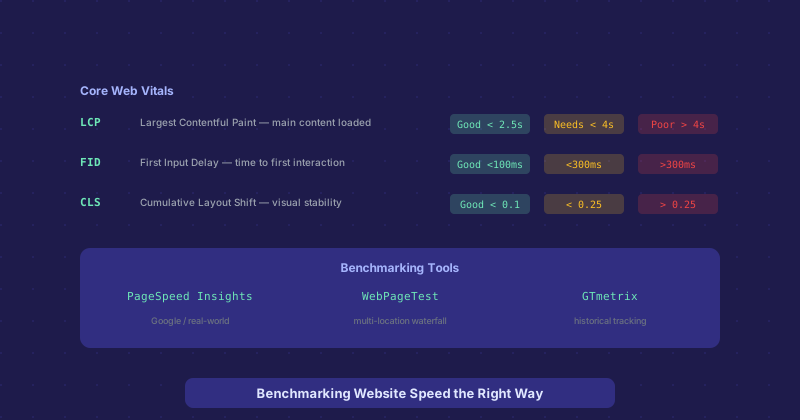
Google defines three Core Web Vitals that represent user experience more accurately than raw load times:
Largest Contentful Paint (LCP) measures when the largest visible element on the page finishes loading — typically the hero image or main heading. Good is under 2.5 seconds. This is the metric most closely associated with perceived load speed.
Interaction to Next Paint (INP) replaced First Input Delay in 2024 and measures responsiveness across all interactions during a page visit. Good is under 200 ms. Poor JavaScript execution is the most common cause of bad INP scores.
Cumulative Layout Shift (CLS) measures visual stability — how much the page layout jumps around while loading. Good is under 0.1. Layout shift from images without defined dimensions, late-loading ads, or dynamically injected content causes CLS.
The Right Tools for Each Purpose
PageSpeed Insights combines lab data (simulated test) with field data (real user measurements from Chrome UX Report). The field data is what actually matters for SEO — Google ranks based on real user experience, not lab scores. If your lab score is 40 but field data shows good Core Web Vitals, your SEO is fine even though the lab score looks alarming.
WebPageTest is the most detailed tool available. It shows a waterfall chart of every request, filmstrip screenshots of how the page loads visually, and lets you test from specific cities with specific connection speeds. Use it when you need to diagnose what specifically is slow. The "Opportunities" view highlights the highest-impact improvements.
GTmetrix provides historical tracking — you can see how your speed metrics change over time and after deployments. The waterfall view is clean and the reporting is good for sharing with clients or stakeholders.
Testing From the Right Location
If 80 percent of your visitors are in Europe and you test from a US-based tool, your results are not representative of your users. Test from locations where your users actually are. WebPageTest lets you pick test nodes from dozens of cities worldwide. Most CDN providers also offer location-based test tools. A site hosted in Germany will get dramatically different results when tested from London versus Sydney.
Separating Real Problems from Noise
Not every PageSpeed recommendation is worth acting on. "Eliminate render-blocking resources" might mean adding an async attribute to a small script that takes 5 ms to load — not a meaningful improvement. Focus on changes that move the needle on actual Core Web Vitals, particularly LCP (usually image optimization and server response time) and CLS (usually missing image dimensions or unstable layout elements). The Lighthouse performance score is a proxy metric; the Core Web Vitals are what actually affect user experience and SEO.
Establishing a Baseline Before Making Changes
Before optimizing anything, run at least five tests from two or three locations and record the median results for each Core Web Vital. This is your baseline. After each change, run the same tests and compare. This is the only way to know whether a specific change helped. Many optimization efforts fail because changes are layered together without individual measurement, making it impossible to know which changes helped and which made no difference.