How Object Storage Works and Why It's Different from File Storage
Object storage is how most websites and applications store images, videos, backups, user uploads, and static assets today. Services like Amazon S3, Cloudflare R2, Backblaze B2, and Google Cloud Storage dominate this space. Understanding what makes object storage different from traditional file storage, and why those differences matter practically, helps you make the right architectural decisions when you need to store binary data at scale.
The Three Models: Block, File, and Object Storage
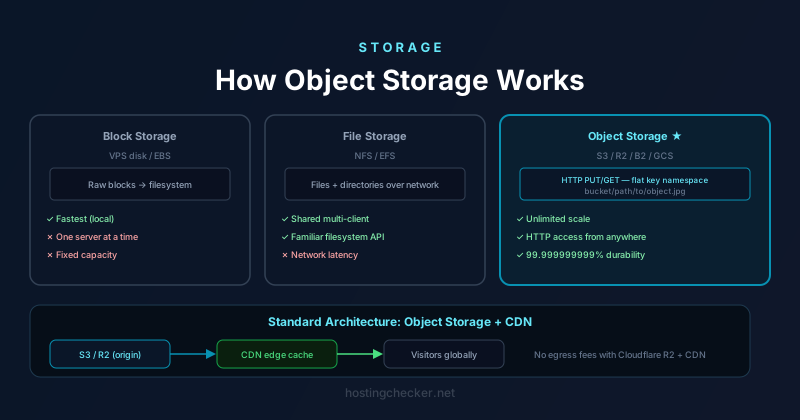
Block storage presents raw storage capacity to a server as a virtual disk. The operating system manages the filesystem on top of that disk. This is how a VPS's disk works — the cloud provider gives you a block device, and you format it and mount it as you would a physical drive. Block storage is fast and flexible but tied to a single server (or a small cluster with shared block storage). It cannot be accessed simultaneously from many different machines without additional infrastructure.
File storage (like NFS or SMB network shares) presents a shared filesystem over a network. Multiple clients can read and write files simultaneously using familiar directory and file semantics. Managed file storage services like Amazon EFS and Azure Files provide this. File storage is useful for shared access patterns but introduces network latency compared to local block storage and can become a scalability bottleneck when many concurrent clients access the same filesystem.
Object storage replaces the filesystem with a flat namespace of objects identified by keys. An object is a blob of arbitrary bytes — an image file, a video file, a PDF, a gzip archive — plus a set of metadata key-value pairs. Objects are accessed via HTTP rather than through a filesystem API. There are no directories in the traditional sense (though key names containing slashes are often displayed as if they were directory paths). There is no concept of modifying part of a file — to update an object you replace it entirely. This seemingly restrictive model has proven enormously scalable.
Why Object Storage Scales
The HTTP-based access model and the flat key namespace make object storage systems much easier to scale than filesystems. A filesystem must maintain a consistent view of a tree of directories and files across all operations, which requires coordination between components. Object storage systems can distribute objects across many storage nodes based on their key hash, with no global filesystem state to maintain. Adding more storage capacity is a matter of adding more nodes to the cluster. Amazon S3 stores trillions of objects and handles millions of requests per second — a scale that would be impossible with a traditional distributed filesystem.
The eventual consistency model (now mostly consistent, following Amazon's 2020 upgrade to S3) further enables scale: writes and deletes do not need to be immediately visible everywhere in the system. For most use cases, the brief window of potential inconsistency is acceptable in exchange for the availability and performance gains of not requiring strict global consistency.
How HTTP Access Works
Objects in an S3-compatible store are accessed via HTTP GET requests to URLs of the form https://bucket-name.s3.amazonaws.com/object-key. Uploading objects uses HTTP PUT. Deleting uses HTTP DELETE. Listing objects in a bucket uses HTTP GET with query parameters. This HTTP API is the same interface exposed by S3, Cloudflare R2, Backblaze B2, DigitalOcean Spaces, and most other object storage services — S3 compatibility has become the de facto standard for object storage APIs.
Access control is handled through bucket policies and object ACLs. A bucket can be configured as publicly readable, in which case any URL for an object in that bucket is publicly accessible without authentication. For private objects, requests must be signed with credentials that the storage service verifies. Pre-signed URLs provide a way to grant temporary access to private objects: you generate a signed URL with an expiry time, and share that URL with anyone who needs time-limited access to download the object, without exposing your credentials or making the object permanently public.
Integrating Object Storage with CDNs
Object storage is not a CDN — requests for objects go to the storage provider's infrastructure in the region where the bucket is located, which may be far from some of your users. The standard architecture for serving static assets at scale is to put a CDN in front of the object storage bucket. The CDN pulls objects from the bucket on first request, caches them at edge locations around the world, and serves subsequent requests from whichever edge location is closest to the visitor.
Cloudflare R2 is notable for being designed with this architecture in mind: it has no egress fees for data transferred to Cloudflare's own CDN, making the storage plus CDN combination economically attractive. S3 charges for data transfer out to the internet, which can be significant for high-traffic sites serving large files. Using a CDN in front of S3 reduces egress costs because the CDN caches content at the edge, reducing the number of times files are pulled from S3 over the internet.
Use Cases: What Object Storage Is Right For
Object storage is the right choice for any data that is accessed by URL, needs to persist independently of any particular server, or needs to be accessible from multiple locations. User-uploaded content — profile images, document attachments, video uploads — fits this model perfectly. Storing these files on the web server's local filesystem creates a tight coupling between files and servers that makes scaling horizontally (running multiple web server instances) impossible without a shared filesystem or storage sync. Object storage decouples the files from the servers entirely: all server instances write uploads to the same bucket and construct URLs pointing to the storage service.
Static asset hosting is another primary use case. HTML, CSS, JavaScript, images, and fonts that are part of your site's frontend can all be served from object storage with CDN caching, offloading traffic from your application servers. Many frontend deployments on platforms like Netlify and Vercel are essentially this architecture: build outputs are uploaded to object storage, served through a global CDN, with application logic handled by serverless functions at the edge.
Database and application backups are a third use case where object storage's durability guarantees (S3 offers eleven nines of durability by default, meaning extreme redundancy) and low cost make it the right destination. Backups written to S3 are replicated across multiple data centres automatically, with versioning available to retain previous versions of objects. Lifecycle policies can automatically transition objects to cheaper storage tiers after a defined period and delete them after a retention limit is reached, making automated backup management straightforward.