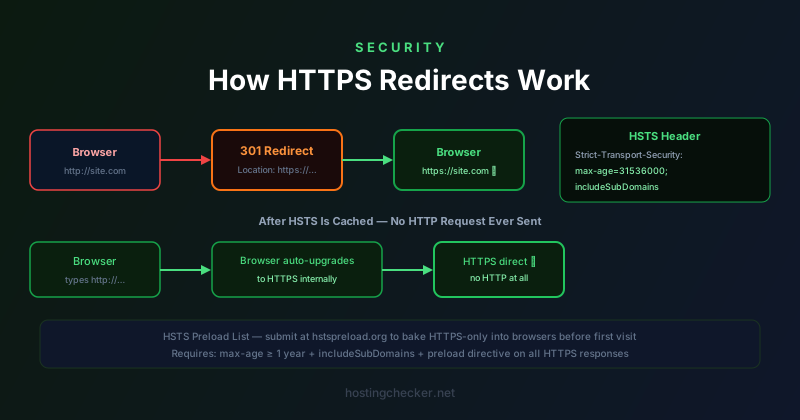
How HTTPS Redirects Work: 301s, HSTS, and Making Sure HTTP Never Loads
Setting up an SSL certificate is only the first step in running a secure website. The second, equally important step is ensuring that every visitor who arrives over HTTP is redirected to HTTPS, and that browsers never attempt the insecure connection in the first place. The mechanics of this involve HTTP redirects, HTTP Strict Transport Security headers, and browser preload lists, each playing a different role in the overall security posture.
The Basic 301 Redirect
The simplest approach to forcing HTTPS is a server-side redirect. When a request arrives on port 80 (HTTP), the server responds with an HTTP 301 Moved Permanently or 302 Found status code and a Location header pointing to the HTTPS version of the same URL. The browser follows this redirect automatically, making a new request to the HTTPS URL.
A 301 redirect is permanent, meaning browsers and search engines are expected to update their records and go directly to the HTTPS URL in future. A 302 redirect is temporary, meaning the redirect is expected to change and clients should keep checking. For HTTP to HTTPS redirection, 301 is almost always the right choice. Search engines will consolidate ranking signals to the HTTPS URL and update their index to point directly there, which is the correct behaviour.
In Apache, this redirect is typically configured with a rewrite rule in the virtual host configuration or in a .htaccess file. In nginx, it is a separate server block for port 80 that issues a return 301. In application-level frameworks, it is sometimes handled by middleware. Each approach achieves the same result: HTTP requests are immediately bounced to HTTPS.
The Fundamental Problem with Redirect-Only Approaches
A 301 redirect works well for returning visitors and search engine crawlers, but it has a critical weakness: the first request to your site is always made over HTTP before the redirect happens. That first connection — even if it immediately redirects — is unencrypted. An attacker positioned between the user and the network (a classic man-in-the-middle scenario on a shared Wi-Fi network, for example) could intercept that first HTTP request before the redirect occurs and serve their own response instead.
This vulnerability is the motivation for HTTP Strict Transport Security. HSTS is a response header that instructs browsers to never make an HTTP connection to a domain — to treat all requests to that domain as HTTPS from the moment the header is seen. Once a browser has received an HSTS header for your domain, it will automatically rewrite any HTTP request to HTTPS before the connection is made, without ever sending an unencrypted packet.
How HSTS Works
The HSTS header is sent in the HTTP response from your HTTPS server. It looks like this: Strict-Transport-Security: max-age=31536000; includeSubDomains. The max-age value tells the browser how long to remember the HSTS policy, in seconds. 31536000 is one year. The includeSubDomains directive extends the policy to all subdomains of the domain — if www.example.com sends HSTS with includeSubDomains, then api.example.com, mail.example.com, and any other subdomain will also be treated as HTTPS-only.
Once a browser has recorded an HSTS policy for a domain, it will refuse to make an HTTP connection to that domain for the duration of the max-age period. If the HTTP site is unavailable or returns a redirect that cannot be followed (because the HTTPS site's certificate is invalid, for example), the browser will show an error rather than falling back to HTTP. This is intentional: HSTS is a security control, and allowing fallback to HTTP would defeat its purpose.
HSTS Preloading
HSTS still has a first-visit problem: a brand-new visitor who has never been to your site before has no HSTS policy cached for your domain and their first request will still go over HTTP before being redirected. HSTS preloading solves this by including your domain in a list that is compiled into browsers before they are released to users.
The HSTS preload list is maintained at hstspreload.org. Submitting your domain to the preload list requires that your site meet certain criteria: you must serve HTTPS correctly, send an HSTS header with a max-age of at least one year, include the includeSubDomains directive, and include a preload directive in the header. The preload directive indicates that you consent to your domain being included in browser preload lists.
Once submitted, your domain is reviewed and added to the preload list, which is then included in Chrome, Firefox, Safari, and other browsers in subsequent releases. Any browser with that list baked in will never attempt an HTTP connection to your domain, even on the very first visit from a device that has never seen your site before. This is the strongest HTTPS enforcement available short of actually disabling the HTTP listener entirely.
includeSubDomains and Its Implications
The includeSubDomains directive deserves careful thought before you add it, especially if you are submitting to the preload list. Once browsers have the HSTS+includeSubDomains policy for your domain, every subdomain must serve valid HTTPS or become inaccessible. If you have a staging subdomain, a development subdomain, an internal tool subdomain, or a legacy service that only runs on HTTP, HSTS with includeSubDomains will break it from browsers that have the policy cached.
Make sure every subdomain of your domain that is accessed by browsers either serves valid HTTPS or is not browser-accessible before enabling includeSubDomains. The consequence of getting this wrong — after submitting to the preload list in particular — can be difficult to reverse: removing a domain from the preload list takes months because browsers need to release updates that include the removal.
Common Redirect Configuration Mistakes
One common mistake is redirecting www to non-www (or vice versa) separately from the HTTP to HTTPS redirect, creating redirect chains. A browser hitting http://www.example.com should end up at https://example.com in a single redirect if possible, not http://example.com first (HTTP to HTTPS) and then to https://example.com (www to non-www). Redirect chains add latency and can occasionally cause browser issues. Configure your redirects to combine both steps wherever the routing logic permits.
Another mistake is forgetting to redirect all content, not just the homepage. If a user bookmarks http://example.com/pricing and the redirect configuration only handles the root path, they may see an HTTP version of the pricing page even when everything else is HTTPS. The redirect rule should match any path on port 80 and redirect it to the HTTPS equivalent of the same path.
Testing Your HTTPS Redirect Setup
Testing HTTPS redirect configuration should include checking the redirect chain (using curl with the -L flag to follow redirects, or a browser developer tools network tab), verifying the HSTS header is present on HTTPS responses, checking that all subdomains are covered if includeSubDomains is used, and confirming that no mixed content remains on any HTTPS page. The SSL Labs Server Test at ssllabs.com provides a comprehensive report that includes HSTS configuration analysis and identifies common misconfigurations. Running it against your domain after making any changes gives you an independent verification before users encounter any problems.