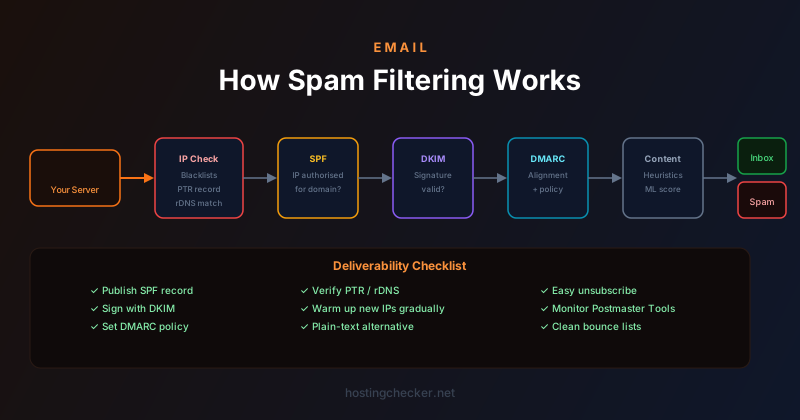
How Email Spam Filtering Works: SPF, DKIM, DMARC, and What Happens to Your Message
Sending an email is trivial. Getting it delivered to the inbox is increasingly not. The spam filtering infrastructure that stands between your outgoing mail server and your recipient's inbox applies dozens of checks and signals to every message, and failing any significant one can result in your message being silently dropped, sorted to spam, or outright rejected. Understanding how this works is essential for anyone running a business that relies on email.
The Journey of an Outbound Email
When you send an email, your mail client submits it to a mail server, which queues it for delivery and attempts to connect to the receiving mail server. The sending server looks up the MX records for the recipient domain to find which mail server to connect to, establishes a TCP connection on port 25, and conducts an SMTP conversation to transfer the message. This happens in seconds, and at each step of the conversation, the receiving server is making decisions about whether to accept, defer, or reject the message.
The initial checks happen at the connection level, before the message content is even transmitted. The receiving server checks whether the sending IP address appears on any real-time blacklists. It may check whether the sending IP has a valid reverse DNS record (PTR record) that matches the hostname presented in the SMTP EHLO command — a missing or mismatched PTR record is a common mark of illegitimate sending infrastructure. These connection-level checks are lightweight and reject obviously problematic senders before expending resources on content analysis.
SPF Checking
Once the SMTP conversation reaches the point where the sender's domain is declared in the MAIL FROM command, the receiving server can perform an SPF check. It looks up the SPF TXT record for the sending domain, which lists the IP addresses and mail servers authorised to send mail claiming to be from that domain. If the sending IP is listed as authorised, the SPF check passes. If it is not listed, the result is either a "fail" (the record explicitly denies it) or "softfail" (the record suggests the IP is not authorised but does not mandate rejection).
SPF alone is not sufficient and has a significant limitation: it only checks the envelope sender (the MAIL FROM domain in the SMTP conversation), not the From header that recipients see in their email client. These two can differ in legitimate forwarding scenarios, which is why SPF breaks when email is forwarded through intermediaries — the forwarding server sends the message with its own IP but with the original MAIL FROM domain, which the original SPF record does not authorise.
DKIM Signing and Verification
DKIM (DomainKeys Identified Mail) takes a different approach. Instead of authorising sending IPs, DKIM uses public key cryptography to sign the message. The sending mail server signs the message (or specific parts of it) with a private key, and includes the signature in a DKIM-Signature header. The public key is published in a DNS TXT record for the sending domain, typically at a selector subdomain like mail._domainkey.example.com.
The receiving server retrieves the public key from DNS and uses it to verify the signature. If the signature is valid, the message was sent by someone who has access to the private key and has not been modified in transit. DKIM survives email forwarding (as long as the message content is not modified), which makes it more robust than SPF for verifying that a message genuinely came from the domain it claims to be from.
DMARC: Tying It Together
DMARC (Domain-based Message Authentication, Reporting, and Conformance) uses the results of both SPF and DKIM checks to make a policy decision, and crucially requires "alignment" between those checks and the From header that recipients see. A message passes DMARC if either SPF passes and the SPF-authenticated domain aligns with the From domain, or DKIM passes and the DKIM-authenticated domain aligns with the From domain.
The DMARC policy (published as a TXT record at _dmarc.example.com) tells receiving servers what to do when a message fails the DMARC check: none (take no action but report), quarantine (treat with suspicion — typically route to spam), or reject (do not accept the message). A policy of p=reject means any mail claiming to be from your domain that fails DMARC should be rejected outright, which is the strongest protection against domain spoofing. Reaching that policy level safely requires ensuring all your legitimate sending sources are covered by SPF and DKIM first.
Content and Reputation Signals
Even with perfect SPF, DKIM, and DMARC, messages are still evaluated on content and reputation signals. Spam filters score messages using dozens of heuristics: the ratio of image content to text, the presence of suspicious link patterns, use of URL shorteners, certain phrases associated with spam, HTML-only emails without a plain text version, and many others. These content signals are combined with the sender's reputation history to produce an overall spam score.
Domain reputation and IP reputation are maintained by the major providers based on historical sending behaviour: complaint rates (how often recipients click "report spam"), spam trap hits, engagement rates (whether recipients open and respond to messages from this sender), and unsubscribe rates. A sender with a good reputation can afford to make a few content mistakes without landing in spam. A sender with no reputation history (a brand-new domain or IP) starts with no credit in any direction and needs to build reputation through consistent, policy-compliant sending.
Gmail, Outlook, and Provider-Specific Filters
Each major receiving provider runs its own filter implementation. Gmail's filters are machine-learning based and use the collective behaviour of Gmail users (mass spam-flagging of a particular sender, for example) as a signal. Microsoft's Exchange Online Protection applies a similar combination of rule-based and ML-based filtering. Yahoo and AOL use their own systems. A message that passes all authentication checks and scores well on generic spam heuristics may still land in spam at one provider while being delivered to the inbox at another, because the provider-specific models have learned different patterns.
Google Postmaster Tools and Microsoft's SNDS (Smart Network Data Services) provide visibility into your reputation at those providers specifically. If you are sending significant volume, enrolling in both and monitoring the dashboard is the best way to detect reputation problems early — often before they manifest as the inbox delivery rates you can observe from your sending platform.
Improving Deliverability Practically
The practical checklist for good deliverability starts with authentication: publish complete SPF, DKIM, and DMARC records and verify they are working correctly using tools like MXToolbox or mail-tester.com. Establish a sender reputation gradually by warming up new sending domains and IPs with low volume before ramping to high volume. Keep your list clean by removing addresses that consistently bounce or never engage. Make unsubscribing trivially easy — recipients who cannot find an unsubscribe link will click "report spam" instead, which damages your reputation. Provide a plain-text alternative alongside HTML messages. Monitor your complaint rates and bounce rates, and investigate spikes immediately rather than letting problems compound.