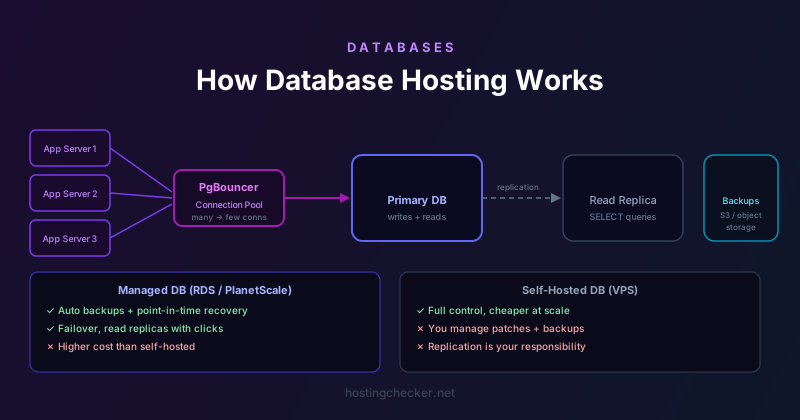
How Database Hosting Works: Managed vs Self-Hosted, Backups, and Connection Pools
The vast majority of dynamic websites depend on a database. WordPress sites use MySQL. Rails applications default to PostgreSQL. Django sites can use either. The database is where all persistent data lives — posts, users, orders, settings. How that database is hosted, managed, and backed up is as important as how the web server is configured, yet it often receives far less attention from developers and site owners who are more comfortable with the frontend stack.
The Database in a Typical Shared Hosting Setup
On traditional shared hosting, the database runs on the same server as the web server, or on a shared database server within the same facility. cPanel and similar control panels provide MySQL or MariaDB database management: you create a database, create a database user, assign privileges, and connect your application using the credentials. The database server is managed by the hosting provider — you do not have root access to configure it, tune it, or restart it. You get a database, not a database server.
This arrangement works well for most small websites. The database is physically close to the web server (often on the same machine), so query round-trips are microseconds. The hosting provider handles software updates and basic infrastructure maintenance. The limitation is the shared nature: database resources (CPU, memory, I/O) are shared among all tenants, and a misconfigured or high-traffic neighbour application can create lock contention, slow queries, or connection exhaustion that affects everyone on the server.
Managed Database Services
Cloud providers offer managed database services: AWS RDS and Aurora, Google Cloud SQL, Azure Database for PostgreSQL and MySQL, PlanetScale, Neon, Railway, Supabase, and others. These services provision a dedicated database instance (or a serverless database endpoint) that is separate from your application servers. You connect to it over a network connection, and the cloud provider handles the underlying infrastructure, operating system patches, database software updates, high-availability failover, automated backups, and monitoring.
The advantages of managed services are significant. High-availability configurations (read replicas, multi-AZ standby) are available with a few clicks. Automated daily backups with point-in-time recovery allow you to restore to any moment within the backup retention window. Performance insights tools show slow queries, index usage, and lock contention. Scaling storage up is typically online, without downtime. The cost is higher than a self-hosted database for equivalent raw compute, but the operational cost of managing your own database server — security patches, replication configuration, backup scripting, monitoring, and on-call response to failures — is considerable.
Self-Hosted Databases on VPS
Running your own database on a VPS gives you full control at the cost of full responsibility. You install the database software, configure it for performance (buffer pool size, checkpoint settings, connection limits), set up replication for high availability, write backup scripts, monitor query performance, and handle software updates. This is the right approach when you need database configurations that managed services do not support, when regulatory requirements mandate you control the hardware, or when the economics of very large databases make managed services prohibitively expensive.
Self-hosted databases are vulnerable to the failure modes that managed services engineer around. If the VPS host has a hardware failure and you do not have replication set up, your database is unavailable until the host recovers the server. If your backup script has been failing silently, a deletion accident or corruption event may have no usable recovery point. Many database disasters at small and medium businesses are caused not by sophisticated attacks or rare hardware failures but by the absence of tested backup and recovery procedures.
Connection Pooling
Database connections are expensive to establish. Each new connection requires a TCP handshake, authentication, and session initialisation. A web application that opens a new database connection for each incoming HTTP request will be slow and will exhaust the database server's connection limit under any significant load. Connection pooling addresses this by maintaining a pool of pre-established connections that are reused across requests.
In many web frameworks, connection pooling is built in or handled by the database driver. PHP applications using PDO or MySQLi can use persistent connections. Python applications using SQLAlchemy benefit from its built-in connection pool. But the most robust approach for high-traffic applications is an external connection pooler that sits between the application servers and the database: PgBouncer for PostgreSQL, ProxySQL for MySQL. These tools maintain a small number of database connections and multiplex thousands of application connections through them, dramatically reducing the load on the database server while allowing much higher application concurrency.
Connection pooling is particularly important in serverless or containerised environments where many short-lived instances each try to open their own database connections. A serverless function deployment that scales to hundreds of concurrent instances, each trying to hold open a database connection, can exhaust connection limits on even a large database server. A connection pooler in front of the database solves this architectural problem.
Backups: What You Actually Need
Database backups require more thought than file backups. A database is a live, changing data structure. A file-copy backup of database files while the database is running will likely be corrupt because data may be partially written. Correct database backups use database-native tools: mysqldump for MySQL and MariaDB, pg_dump for PostgreSQL, or snapshot-based backups using storage-level snapshots that coordinate with the database for consistency.
The backup schedule should be driven by your recovery point objective: how much data you can afford to lose in the worst case. Daily backups mean you can lose up to 24 hours of data. Hourly backups reduce that to one hour. Point-in-time recovery using binary logs (MySQL) or WAL archiving (PostgreSQL) allows recovery to any moment between full backups, at the cost of storing the log stream in addition to periodic full backups.
Backups must be tested. A backup you have never tested restoring from is a backup of unknown reliability. Periodically restore your database backup to a test environment and verify the data is intact and the application runs against it. The first time you discover a problem with your backup should be during a test restore, not during an actual disaster recovery.
Read Replicas and Scaling Reads
Read replicas are additional database instances that receive a copy of all writes from the primary database through replication. Application queries that do not modify data (SELECT statements) can be routed to replicas, distributing the read load across multiple instances. This is one of the most effective ways to scale database performance for read-heavy workloads like content sites, analytics dashboards, or e-commerce product catalogues.
Replication introduces a small lag between writes on the primary and their visibility on replicas. For most read queries this is acceptable — a blog comment that takes a few hundred milliseconds to appear on a replica is not a problem. For queries that must see the immediately-preceding write (reading back a record that was just inserted, for example), those queries should be routed to the primary. Most ORMs and database drivers support directing specific connections or queries to read replicas versus the primary, allowing the application layer to make this routing decision.