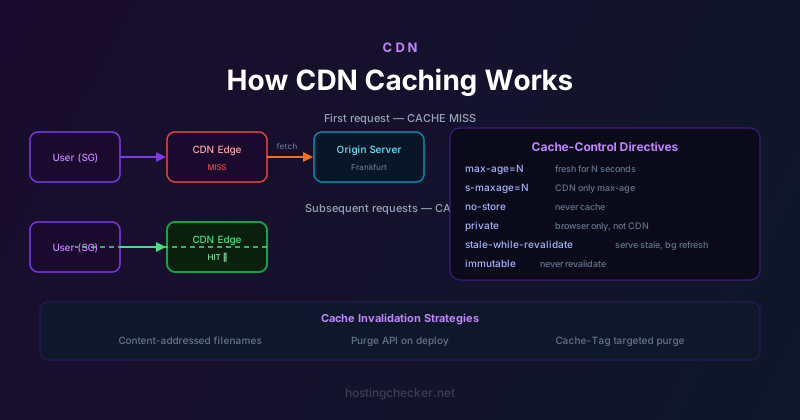
How CDN Caching Works: TTLs, Cache-Control Headers, and Invalidation
Content delivery networks serve cached copies of your content from edge servers around the world, dramatically reducing latency for distant visitors and offloading traffic from your origin server. But caching introduces its own complexity: what gets cached, for how long, and how do you update it? Getting this wrong means either visitors seeing stale content after you update your site, or the CDN fetching your origin on every request and providing no performance benefit at all.
How CDNs Decide What to Cache
A CDN caches a response based on a combination of the response status code, the Cache-Control and Expires headers from your origin server, and the CDN's own configuration rules. The CDN's edge server, upon receiving a request it does not have a cached response for, forwards the request to your origin, receives the response, and then decides whether and how long to store that response based on the caching headers.
By default, most CDNs apply different treatment to different status codes and content types. 200 OK responses with caching headers are cached according to those headers. 301 redirects are often cached for a long time by default because they are intended to be permanent. 404 responses are sometimes cached briefly to prevent the CDN from repeatedly hammering your origin when a URL does not exist and is being requested frequently. The specific default behaviours vary by CDN provider and can usually be overridden by your configuration rules.
The Cache-Control Header
Cache-Control is the primary mechanism for controlling caching behaviour. It is an HTTP response header set by your origin server that tells both CDNs and browser caches what they are allowed to do with a response. The most important directives are:
max-age=N tells caches (both CDNs and browsers) to consider the response fresh for N seconds. s-maxage=N overrides max-age for shared caches (CDNs) specifically, allowing you to cache at the CDN for a longer duration than you want the browser to cache. no-cache means the cache must revalidate with the origin before serving the cached response (it does not prevent caching entirely, despite the name). no-store means the response must not be stored in any cache at all. private means the response is user-specific and should only be cached by the browser, not by shared CDN caches. public explicitly marks the response as cacheable by shared caches.
A typical static asset like a CSS or JavaScript file with content-addressed filenames (the filename includes a hash of the contents, like main.a3f8b2.css) should be served with Cache-Control: public, max-age=31536000, immutable. The max-age of one year means caches treat it as permanently fresh. The immutable directive tells supporting browsers not to even bother revalidating on reload. Because the filename changes when the content changes, you will never serve a stale version — a new deployment produces a new filename.
The Vary Header and Cache Keys
CDNs cache responses keyed by URL. But some responses vary by request header — a response that differs based on the Accept-Language header should not serve the English version to a French visitor who made a request to the same URL. The Vary header tells caches to include specific request headers in the cache key. Vary: Accept-Language means the CDN maintains separate cached copies for each Accept-Language value it has seen.
Overusing Vary can severely degrade CDN effectiveness. If you set Vary: User-Agent, the CDN must maintain separate caches for every distinct User-Agent string it sees — which in practice means almost no caching, because user agent strings vary enormously. Use Vary only for headers that genuinely produce different responses, and keep the number of such headers small.
Cache Revalidation with ETags and Last-Modified
When a cache has a stored response that has expired (its max-age has passed), it does not necessarily have to fetch the entire response again. If the original response included an ETag header (a unique identifier for the response content) or a Last-Modified header (a timestamp of when the content was last modified), the cache can send a conditional request: If-None-Match: "abc123" or If-Modified-Since: Wed, 01 Jan 2025 00:00:00 GMT. If the origin has not changed the content, it responds with 304 Not Modified and no body — the cache keeps its stored copy and refreshes the expiry. This revalidation mechanism saves bandwidth when content is unchanged but prevents indefinitely serving stale content.
Cache Invalidation and Purging
Cache invalidation is famously one of the hard problems in computer science. When you deploy a new version of your site, you need to ensure the CDN stops serving old cached copies. There are several strategies for this.
Content-addressed filenames, as mentioned above, sidestep the problem entirely for static assets: a new file has a new name and is treated as a new cache entry. HTML files that reference these assets are typically served with short or no-cache headers, so the HTML always reflects the latest references to the latest asset filenames.
For content that does not use content-addressed names — CMS-managed pages, API responses, images at fixed URLs — you need to actively purge cached copies when the content changes. Most CDN providers offer a purge API that allows you to invalidate specific URLs or patterns. Cloudflare, for example, lets you purge by URL, by tag (using Cache-Tag headers), or purge everything. The cache tag approach is particularly powerful: by tagging responses with identifiers related to their underlying data (the ID of a database record, for example), you can precisely invalidate all cached responses that depend on a particular piece of data when that data changes, without touching unrelated cached content.
Stale-While-Revalidate and Stale-If-Error
Two relatively modern Cache-Control extensions are worth understanding. stale-while-revalidate=N tells the cache that when a cached response has expired, it is acceptable to serve the stale response for up to N seconds while asynchronously fetching a fresh copy in the background. This improves perceived performance: the user never waits for the revalidation request. stale-if-error=N tells the cache to serve a stale response for up to N seconds if the origin returns an error (5xx status). This provides resilience: if your origin has a temporary problem, visitors see slightly outdated content rather than an error page.
Both of these are particularly useful for high-traffic sites where the cost of a cache miss — sending a request to the origin — is significant, or where origin reliability is a concern. Cloudflare and other major CDNs support these directives, though their implementation details vary.
Debugging CDN Cache Behaviour
When caching is not working as expected, the diagnostic approach involves inspecting response headers. CDNs typically add their own response headers indicating whether a response was a cache hit or miss, how long the cached copy will remain valid, and which edge location served the request. Cloudflare adds CF-Cache-Status with values like HIT, MISS, EXPIRED, and BYPASS. Fastly adds X-Cache with HIT or MISS. Reading these headers alongside the Cache-Control header from your origin helps you understand exactly what the CDN is doing and why.