What Actually Happens When a Domain Expires (and How to Get It Back)
A domain expiring is not the same as a domain disappearing. There is a multi-stage process with recovery windows at each step. Miss all of them and the domain goes back on the open market. Here is exactly what happens and when.
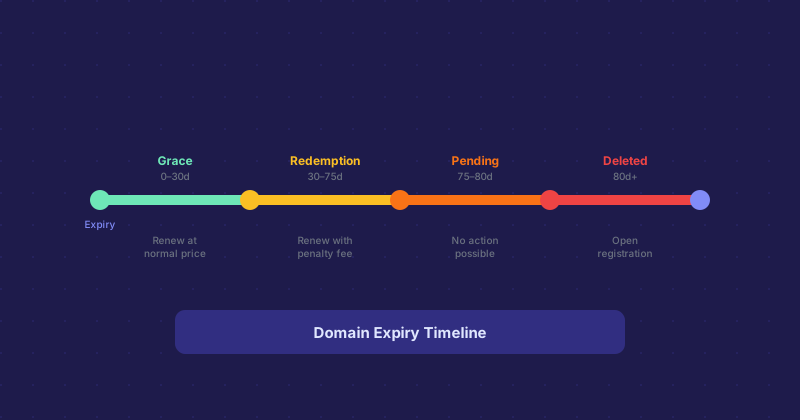
Stage 1: The Grace Period (0–30 days after expiry)
Right after a domain expires, most registrars give you a grace period — typically around 30 days — during which you can renew at the normal price. The site usually goes offline at expiry or shortly after, but the domain is still yours to renew at standard cost.
During this period the domain is technically expired but not released. It just stops resolving.
Stage 2: The Redemption Period (30–75 days after expiry)
If you miss the grace period, the domain enters redemption. You can still get it back, but you will pay a redemption fee on top of the renewal cost. Registrars set these fees, and they are typically in the range of $80–$200 depending on the TLD and registrar. Painful but not fatal.
During redemption, WHOIS shows the status as redemptionPeriod.
Stage 3: Pending Deletion (75–80 days after expiry)
After redemption, there is a short pending delete phase lasting about 5 days. You cannot renew during this window. The domain is queued for release and no action on your part will stop the process at this point.
Stage 4: Open Registration
After the pending delete period, the domain drops to open registration and anyone can register it. High-value expired domains are watched by drop-catching services that register them the moment they become available. If your domain has any traffic or link equity, you will be competing against automated systems.
How to Avoid Getting Here
Turn on auto-renew at your registrar. Most registrars offer this and it costs you nothing except remembering that the charge is coming. Set expiry reminders in your calendar as a backup. For any domain critical to your business, two years of advance renewal is not overkill.
Checking Expiry Dates
A domain age checker or WHOIS lookup will show you the expiration date for any domain. If you are evaluating a business or a site acquisition, the expiry date is one of the first things to check.