DNS over HTTPS: What It Is, Why It Was Built, and What It Actually Protects
Traditional DNS has a privacy problem that has existed since the protocol was designed in the 1980s: every domain name you look up is sent in plaintext to your DNS resolver, visible to anyone on the network path — your ISP, the router operator at a coffee shop, or anyone monitoring the connection. DNS over HTTPS (DoH) encrypts these queries. Here is how it works and what it actually changes.
The Traditional DNS Privacy Problem
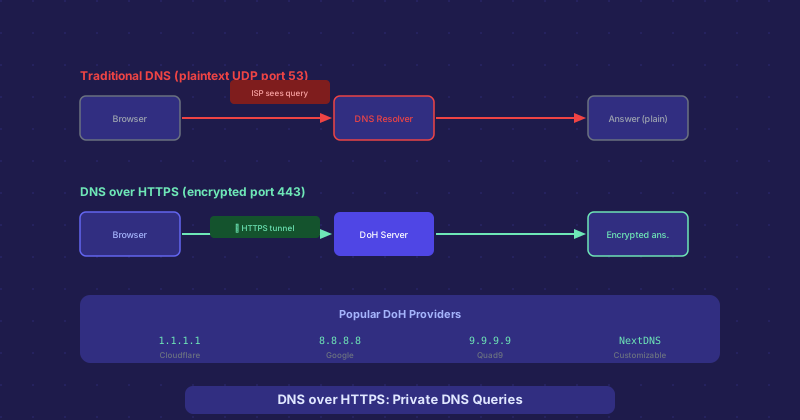
When your browser needs to look up a domain, it sends a UDP packet containing the hostname in plaintext to your configured DNS resolver, typically on port 53. Anyone who can observe your network traffic can see every domain you query. Your ISP, in particular, has traditionally had a comprehensive view of your browsing activity through DNS logs even if they cannot read the encrypted HTTPS content of your connections.
This is not just theoretical. ISPs in some countries are legally required to log DNS queries for surveillance purposes. In others, ISPs have historically sold DNS data commercially. Even without malicious intent, the exposure of which domains you query reveals significant information about your browsing habits.
How DNS over HTTPS Fixes This
DoH wraps DNS queries inside standard HTTPS requests, sent on port 443 — the same port used for all encrypted web traffic. From the network perspective, your DNS queries look identical to any other HTTPS connection. Your ISP can see that you connected to 1.1.1.1 (Cloudflare) or 8.8.8.8 (Google), but cannot see the specific domains you queried inside those encrypted connections.
The protocol is defined in RFC 8484. Queries are sent as HTTP/2 POST or GET requests with a specific content type, and responses come back in the DNS wire format wrapped in HTTPS. The implementation detail that matters most to users is that DoH resolvers run as HTTPS servers, not traditional DNS servers.
Major DoH Providers
Cloudflare was the first to launch a public DoH resolver at 1.1.1.1 in 2018, with a public commitment not to log resolver IP addresses and to have this verified by independent audits. Google followed with 8.8.8.8 supporting DoH, as did Quad9 (9.9.9.9, which also blocks known malicious domains). NextDNS offers a customizable DoH resolver where you can configure your own blocklists, parental controls, and logging preferences.
Browser vs. System DoH
DoH can be implemented at the browser level or the operating system level. Firefox was an early adopter of browser-level DoH — it sends DNS queries through its own DoH resolver (Cloudflare by default) regardless of the system DNS settings. Chrome and Edge support DoH and will upgrade to it automatically if your configured DNS provider supports DoH.
System-level DoH is implemented at the OS or router level and affects all applications, not just the browser. Windows 11 and macOS support DoH natively in network settings. Router-level DoH (supported by some consumer routers and pfSense/OPNsense) applies to all devices on the network without individual device configuration.
What DoH Does Not Protect
DoH encrypts the DNS query, but it does not hide that you made a connection to a specific IP address. Once the DNS query resolves and your browser connects to the web server, the destination IP is visible in network traffic. For sites behind Cloudflare where many domains share IP addresses, this is less revealing. For sites with dedicated IPs, the connection itself is visible even without the DNS query. Server Name Indication (SNI) in the TLS handshake also traditionally revealed the hostname — though Encrypted Client Hello (ECH), gradually rolling out, addresses this.
Should You Enable It?
If you are on a network where DNS privacy matters — a public network, a country with surveillance requirements, or simply if you prefer your ISP not to have a record of your browsing — DoH is worth enabling. The performance cost is minimal; modern DoH resolvers are fast and well-distributed via anycast. If you are on a corporate network, be aware that DoH may bypass corporate DNS filtering and monitoring, which may violate your organization policy.