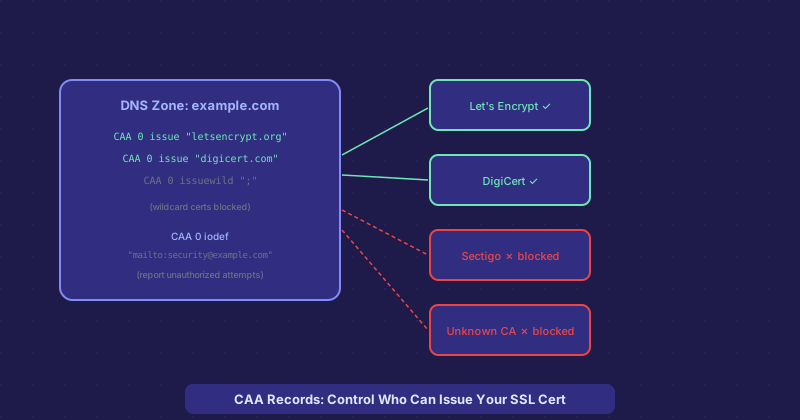
CAA Records: How to Control Who Can Issue SSL Certificates for Your Domain
Certificate misissuance — where a certificate authority accidentally or fraudulently issues an SSL certificate for a domain to someone who does not own it — is a real and documented problem. CAA records give domain owners a DNS-based control to limit which CAs can issue for their domain. Here is how they work.
The Problem CAA Records Solve
Any of the roughly 150 certificate authorities trusted by browsers can technically issue a certificate for any domain. Historically, all that stopped a rogue CA from issuing a fraudulent certificate for your domain was their internal policies and the vigilance of the CA/Browser Forum. This is a weak guarantee — there have been documented cases of misissuance, both accidental and deliberate.
CAA records let you publish a DNS-level policy stating which CAs are authorized to issue for your domain. Before a CA issues a certificate, they are required (per CA/Browser Forum rules since 2017) to check for a CAA record and respect it. If your CAA record says only Let's Encrypt can issue for your domain, then DigiCert, Sectigo, and every other CA must refuse to issue.
CAA Record Syntax
A CAA record has three parts: flags, a tag, and a value. The flags field is almost always 0. The tag specifies what kind of issuance the record controls: issue controls issuance of standard certificates, issuewild controls wildcard certificates, and iodef specifies where CAs should report policy violations.
Example records:
example.com CAA 0 issue "letsencrypt.org"
example.com CAA 0 issue "digicert.com"
example.com CAA 0 issuewild ";"
example.com CAA 0 iodef "mailto:security@example.com"
The first two allow Let's Encrypt and DigiCert to issue standard certs. The issuewild ";" with a semicolon as value blocks wildcard issuance from all CAs. The iodef record asks CAs to send violation reports to your security email.
What Happens Without a CAA Record
If no CAA record exists for a domain, any CA may issue certificates for it — this is the default permissive state. Adding a CAA record immediately narrows this to only the listed CAs. This is a significant security improvement for domains where you have a consistent CA relationship and want to prevent unauthorized issuance.
CAA Inheritance
CAA records apply to subdomains by inheritance. If you have a CAA record at example.com but not at api.example.com, the CAA check for api.example.com walks up the tree and finds the record at the parent domain. You can also set CAA records at the subdomain level to override the parent policy for specific subdomains.
Getting CAA Records Right Before Adding Them
Before you add CAA records, make sure you know exactly which CAs issue certificates for your domain currently. If you add a CAA record that excludes a CA currently issuing your wildcard certificate, that certificate renewal will fail. Check all your existing certificates (including any issued for subdomains) and ensure every CA that needs to issue is included in your CAA records before deploying them.
Using CAA With Automated Certificate Management
If you use Let's Encrypt with auto-renewal via Certbot or ACME, adding CAA 0 issue "letsencrypt.org" is all you need for standard certificates. Cloudflare Origin CA requires "comodoca.com" or "digicert.com" depending on which CA they used. Check your certificate issuer details before writing the CAA record.